概念
触摸输入面向移动设备和触摸屏:
• 多点触控:同时追踪多个手指(通常 5~10 点)
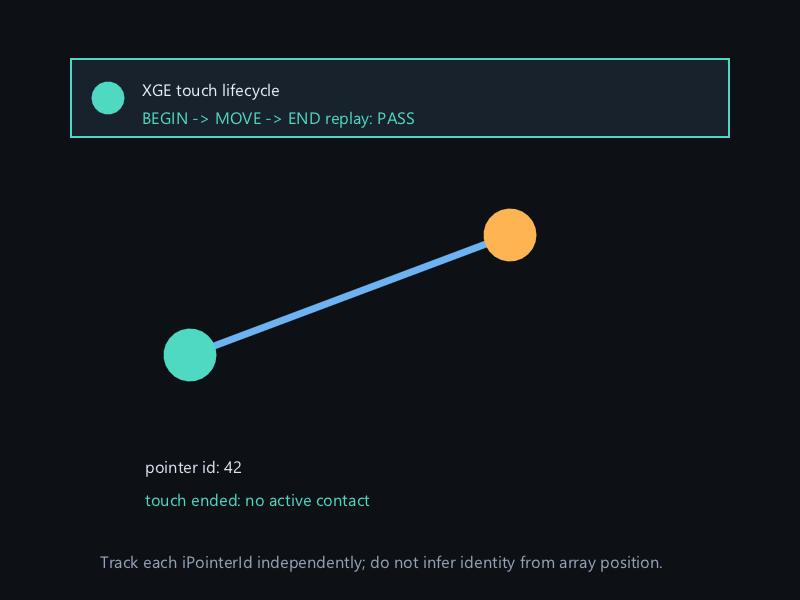
• 触点 ID:每个手指有唯一 uint64_t ID,从按下到抬起不变
• 状态:BEGAN(按下)、MOVED(移动)、STATIONARY(静止)、ENDED(抬起)
TouchGet 按索引遍历,TouchFind 按 ID 精确查找。
API 速查
| 函数 | 说明 |
|---|---|
int xgeTouchGetCount(void) | 当前活跃触点数 |
int xgeTouchGet(int iIndex, xge_touch_point_t* pPoint) | 按索引获取触点 |
int xgeTouchFind(uint64_t iId, xge_touch_point_t* pPoint) | 按 ID 查找触点 |
编译本章示例
gcc -O2 -I. -o ch118.exe ch118_main.c build\xge.lib -lm -lws2_32 -liphlpapi -lgdi32 -luser32 -lshell32 -lopengl32 -lole32 -lwinmm -lavrt
.\ch118.exe
示例:双指缩放 + 单指拖拽
static float lastDist = 0;
static float scale = 1.0f;

void onFrame(void) {
    int count = xgeTouchGetCount();

    if (count == 1) {
        // 单指拖拽
        xge_touch_point_t tp;
        xgeTouchGet(0, &tp);
        if (tp.iState == XGE_TOUCH_MOVE) {
            camX -= tp.fDX;
            camY -= tp.fDY;
        }
    }
    else if (count == 2) {
        // 双指缩放(Pinch)
        xge_touch_point_t t0, t1;
        xgeTouchGet(0, &t0);
        xgeTouchGet(1, &t1);

        float dx = t1.fX - t0.fX;
        float dy = t1.fY - t0.fY;
        float dist = sqrtf(dx*dx + dy*dy);

        if (lastDist > 0) {
            scale *= dist / lastDist;
        }
        lastDist = dist;
    }

    if (count < 2) lastDist = 0;

    // 按 ID 追踪特定手指
    xge_touch_point_t tp;
    if (xgeTouchFind(joystickId, &tp)) {
        // 虚拟摇杆跟随此手指
        joyX = tp.fX - joyOriginX;
        joyY = tp.fY - joyOriginY;
    }
}
完整代码
将以下代码保存为 ch118_main.c,编译后运行即可看到多点触控效果(触摸屏或鼠标模拟):
#include "xge.h"
#include <math.h>

static xge_font g_font = NULL;
static float g_lastDist = 0.0f;
static float g_scale = 1.0f;
static float g_camX = 0.0f, g_camY = 0.0f;

static int onFrame(void* pUser) {
    (void)pUser;
    xgeClear(0x081114FF);

    int count = xgeTouchGetCount();

    if (count == 1) {
        // 单指拖拽
        xge_touch_point_t tp;
        xgeTouchGet(0, &tp);
        if (tp.iState == XGE_TOUCH_MOVE) {
            g_camX -= tp.fDX;
            g_camY -= tp.fDY;
        }
        xgeShapeCircleFill(tp.fX, tp.fY, 15, 0x4FD8C2FF);
    }
    else if (count >= 2) {
        // 双指缩放
        xge_touch_point_t t0, t1;
        xgeTouchGet(0, &t0);
        xgeTouchGet(1, &t1);
        float dx = t1.fX - t0.fX;
        float dy = t1.fY - t0.fY;
        float dist = sqrtf(dx*dx + dy*dy);
        if (g_lastDist > 0) {
            g_scale *= dist / g_lastDist;
            if (g_scale < 0.3f) g_scale = 0.3f;
            if (g_scale > 4.0f) g_scale = 4.0f;
        }
        g_lastDist = dist;
        xgeShapeCircleFill(t0.fX, t0.fY, 15, 0xFF6B5EFF);
        xgeShapeCircleFill(t1.fX, t1.fY, 15, 0xFFB454FF);
    }
    if (count < 2) g_lastDist = 0;

    // 绘制中心方块(受缩放影响)
    float sz = 60.0f * g_scale;
    xgeShapeRectFill(
        (xge_rect_t){400-sz/2-g_camX, 300-sz/2-g_camY, sz, sz},
        0x4FD8C240);

    // HUD
    char buf[128];
    sprintf(buf, "Touches: %d | Scale: %.2f", count, g_scale);
    xgeTextDraw(g_font, buf, 30, 30, 0xFFFFFFFF);

    return XGE_OK;
}

int main(void) {
    xge_desc_t d = {0};
    d.iWidth  = 800;
    d.iHeight = 600;
    d.sTitle  = "ch118 - Touch";
    d.iFlags  = XGE_INIT_VSYNC;
    xgeInit(&d);

    g_font = xgeFontLoad("res/font/default.ttf", 24);
    xgeRun(onFrame, NULL);

    xgeFontFree(g_font);
    xgeUnit();
    return 0;
}
代码讲解
- xgeTouchGetCount:获取当前活跃触点数。
- xgeTouchGet:按索引获取触点信息(位置、位移、状态)。
- 单指拖拽:MOVED 状态时用 fDX/fDY 平移相机。
- 双指缩放:计算两指距离变化比例调整 scale。
- 触点 ID:每个手指有唯一 ID,抬起后索引会重排。
要点与陷阱
- ID 追踪:索引会变(手指抬起后重排),用 ID 追踪特定手指。
- DX/DY:触点帧间位移,MOVED 状态时有效。
- 桌面模拟:Windows 触摸屏/笔输入也走 Touch API。
- 与鼠标共存:触摸设备同时产生 Mouse 事件,需去重。
进阶练习
- 实现虚拟摇杆:左半屏触摸控制移动。
- 手势识别:双击、长按、滑动切换。
已验证实现
权威源码为 examples/tutorial_capture/ch118_main1.c。它以同一个 iPointerId 回放 TOUCH_BEGIN、TOUCH_MOVE、TOUCH_END,验证结束后没有活跃接触点。多点触控中必须按 ID 保存状态,不能把触点数组下标当作永久身份。