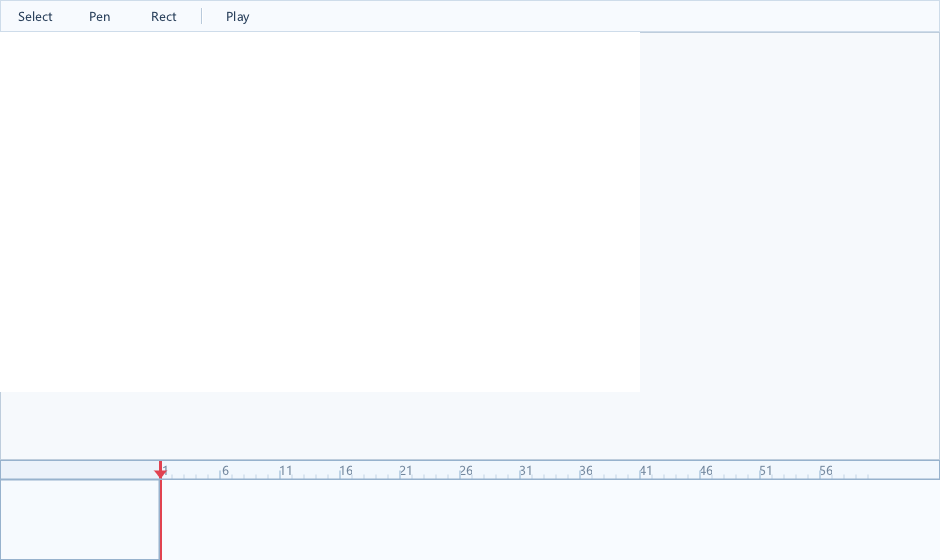
项目概述
构建一个矢量动画编辑器:
• 画布:Canvas 控件 + ShapeEx 路径编辑
• 时间轴:TimelineView 管理关键帧
• 属性面板:PropertyGrid 编辑形状属性
• 图层:TreeView 管理形状层级
• 停靠布局:DockPanel 组织工作区
技术栈
| 模块 | XGE/XUI API |
|---|---|
画布 | xuiCanvas + xgeShapeEx 路径 |
时间轴 | xuiTimeLineView(图层/关键帧/Span) |
属性 | xuiPropertyGrid(颜色/数值/变换) |
图层 | xuiTreeView(形状树/可见/锁定) |
布局 | xuiDockPanel(左/右/下/中央) |
工具栏 | xuiToolbar(选择/钢笔/矩形/椭圆) |
编译本章示例
gcc -O2 -I. -o ch203.exe ch203_main.c src\xui_*.c build\xge.lib -lm -lws2_32 -liphlpapi -lgdi32 -luser32 -lshell32 -lopengl32 -lole32 -lwinmm -lavrt
.\ch203.exe
核心代码:关键帧动画
// 形状关键帧插值
typedef struct {
    float fTime;
    xge_mat3_t tTransform;
    float fOpacity;
    uint32_t iFillColor;
} keyframe_t;

void InterpolateShape(xge_shape_ex pShape,
    keyframe_t* pK0, keyframe_t* pK1, float fT)
{
    float fAlpha = (fT - pK0->fTime) /
        (pK1->fTime - pK0->fTime);

    // 变换插值
    xge_mat3_t tM;
    MatrixLerp(&tM, &pK0->tTransform,
        &pK1->tTransform, fAlpha);
    xgeShapeExTransformSet(pShape, &tM);

    // 透明度插值
    float fOpacity = pK0->fOpacity +
        (pK1->fOpacity - pK0->fOpacity) * fAlpha;
    xgeShapeExOpacity(pShape, fOpacity);
}

// 时间轴播放回调
void OnTimelineTick(float fTime) {
    InterpolateShape(pCurrentShape,
        &g_aKeys[g_iPrev], &g_aKeys[g_iNext], fTime);
    xgeInvalidateRect(tCanvasRect);
}
完整代码
将以下代码保存为 ch203_main.c,编译后运行即可看到简化版矢量动画编辑器框架(画布 + 时间轴 + 属性面板):
#include "xge.h"
#include "xui.h"

static xui_context g_pCtx;

static int onFrame(void* pUser) {
    (void)pUser;
    xgeClear(0x1e1e2e);
    xui_vec2_t pos;
    xgeMouseGet(&pos.x, &pos.y);
    xuiInputPointerMove(g_pCtx, pos.x, pos.y);
    if (xgeMouseDown(XGE_MOUSE_LEFT))
        xuiInputPointerDown(g_pCtx, pos.x, pos.y, 0);
    else
        xuiInputPointerUp(g_pCtx, pos.x, pos.y, 0);
    xuiUpdate(g_pCtx, xgeGetDelta());
    xuiLayout(g_pCtx);
    xuiRender(g_pCtx, NULL, NULL, 0);
    return XGE_OK;
}

int main(void) {
    xge_desc_t d = {0};
    d.iWidth = 960; d.iHeight = 640;
    d.sTitle = "ch203 - Vector Animator";
    d.iFlags = XGE_INIT_VSYNC;
    xgeInit(&d);
    xuiCreate(&g_pCtx);
    extern const xui_proxy_t tXgeProxy;
    xui_proxy_t tXgeProxy = xuiProxyXge();
xuiSetProxy(g_pCtx, &tXgeProxy);
    xuiSetViewportSize(g_pCtx, 960, 640);

    xui_widget pRoot;
xuiPanelCreate(g_pCtx, &pRoot, NULL);
    xuiWidgetSetRect(pRoot, (xui_rect_t){0, 0, 960, 640});

    /* 工具栏 */
    xui_widget pToolbar;
xuiPanelCreate(g_pCtx, &pToolbar, NULL);
xuiWidgetAddChild(pRoot, pToolbar);
    xuiWidgetSetRect(pToolbar, (xui_rect_t){0, 0, 960, 36});
    xuiWidgetSetRect(pToolbar, (xui_rect_t){0, 0, 960, 36});

    /* 画布区域 */
    xui_widget pCanvas;
xuiCanvasCreate(g_pCtx, &pCanvas, NULL);
xuiWidgetAddChild(pRoot, pCanvas);
    xuiWidgetSetRect(pCanvas, (xui_rect_t){200, 36, 560, 440});
    xuiWidgetSetRect(pCanvas, (xui_rect_t){0, 0, 560, 440});

    /* 图层面板(左侧) */
    xui_widget pLayers;
xuiTreeViewCreate(g_pCtx, &pLayers, NULL);
xuiWidgetAddChild(pRoot, pLayers);
    xuiWidgetSetRect(pLayers, (xui_rect_t){0, 36, 200, 440});
    xuiWidgetSetRect(pLayers, (xui_rect_t){0, 0, 200, 440});

    /* 时间轴(底部) */
    xui_widget pTimeline;
xuiTimeLineViewCreate(g_pCtx, &pTimeline, NULL);
xuiWidgetAddChild(pRoot, pTimeline);
    xuiWidgetSetRect(pTimeline, (xui_rect_t){0, 476, 960, 164});
    xuiWidgetSetRect(pTimeline, (xui_rect_t){0, 0, 960, 164});

    xgeRun(onFrame, NULL);
    xuiDestroy(g_pCtx);
    xgeUnit();
    return 0;
}
代码讲解
- 布局结构:工具栏(顶) + 图层树(左) + 画布(中) + 时间轴(底) 经典动画编辑器布局。
- Canvas:中央画布用于绘制/编辑矢量形状。
- TimeLineView:底部时间轴管理关键帧和图层。
- TreeView:左侧图层树管理形状层级、可见性、锁定状态。
要点与陷阱
- Undo/Redo:每次属性修改记录命令,支持撤销链。
- 性能:画布使用 TILED 缓存,仅重绘变化形状。
- 坐标系:画布缩放/平移时,鼠标坐标需逆变换。
- 导出:逐帧光栅化 ShapeEx → PNG 序列/视频。
进阶练习
- 贝塞尔手柄:Canvas 上拖拽控制点编辑曲线路径。
- 洋葱皮:显示前后帧半透明预览。