项目概述
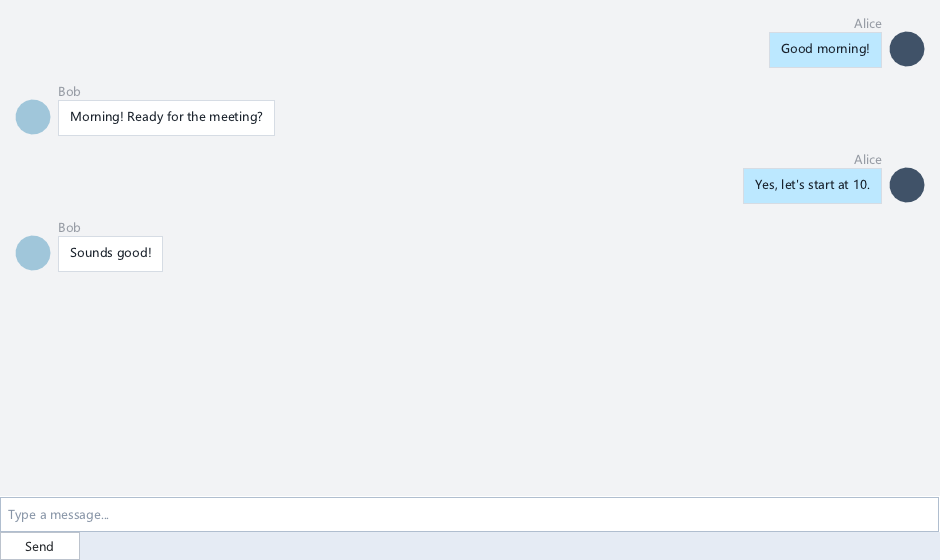
构建即时通讯聊天界面:
• 消息列表:MessageList 显示对话气泡
• 输入框:Input + 发送按钮
• 联系人:ListView 左侧会话列表
• 自动滚动:新消息自动滚到底部
• 时间戳:消息分组 + 时间分隔线
技术栈
| 模块 | XUI API |
|---|---|
消息列表 | xuiMessageListCreate(节点/折叠) |
输入 | xuiInputCreate(多行/Enter 发送) |
会话列表 | xuiListViewCreate(头像/未读徽章) |
滚动 | xuiScrollViewCreate(自动滚底) |
编译本章示例
gcc -O2 -I. -o ch208.exe ch208_main.c src\xui_*.c build\xge.lib -lm -lws2_32 -liphlpapi -lgdi32 -luser32 -lshell32 -lopengl32 -lole32 -lwinmm -lavrt
.\ch208.exe
核心代码:发送与接收消息
// 发送消息
void OnSendClick(void) {
    const char* sText =
        xuiInputGetText(pInput);
    if (!sText || !sText[0]) return;

    // 添加自己的消息(右侧)
    xui_message_node_t tMsg = { 0 };
    tMsg.sText = sText;
    tMsg.bSelf = 1;
    tMsg.sTime = GetCurrentTime();
    xuiMessageListAddNode(pMsgList, &tMsg);

    // 清空输入框
    xuiInputSetText(pInput, "");

    // 滚动到底部
    xuiScrollViewEnsureChildVisible(pScroll);

    // 发送到服务器...
    NetworkSend(sText);
}

// 接收消息回调
void OnMessageReceived(const char* sFrom,
    const char* sText)
{
    xui_message_node_t tMsg = { 0 };
    tMsg.sText = sText;
    tMsg.sSender = sFrom;
    tMsg.bSelf = 0;
    tMsg.sTime = GetCurrentTime();
    xuiMessageListAddNode(pMsgList, &tMsg);
    xuiScrollViewEnsureChildVisible(pScroll);
}
完整代码
将以下代码保存为 ch208_main.c,编译后运行即可看到聊天应用框架(消息列表 + 输入框):
#include "xge.h"
#include "xui.h"

static xui_context g_pCtx;
static xui_widget g_pMsgList;
static xui_widget g_pInput;

static int onFrame(void* pUser) {
    (void)pUser;
    xgeClear(0x1a1a2e);
    xui_vec2_t pos;
    xgeMouseGet(&pos.x, &pos.y);
    xuiInputPointerMove(g_pCtx, pos.x, pos.y);
    if (xgeMouseDown(XGE_MOUSE_LEFT))
        xuiInputPointerDown(g_pCtx, pos.x, pos.y, 0);
    else
        xuiInputPointerUp(g_pCtx, pos.x, pos.y, 0);
    xuiUpdate(g_pCtx, xgeGetDelta());
    xuiLayout(g_pCtx);
    xuiRender(g_pCtx, NULL, NULL, 0);
    return XGE_OK;
}

static void onSend(xui_widget pW, void* pUser) {
    (void)pW; (void)pUser;
    const char* sText = xuiInputGetText(g_pInput);
    if (!sText || !sText[0]) return;
    xui_message_node_t tMsg = {0};
    tMsg.sText = sText;
    tMsg.bSelf = 1;
    xuiMessageListAddNode(g_pMsgList, &tMsg);
    xuiInputSetText(g_pInput, "");
}

int main(void) {
    xge_desc_t d = {0};
    d.iWidth = 640; d.iHeight = 480;
    d.sTitle = "ch208 - Chat App";
    d.iFlags = XGE_INIT_VSYNC;
    xgeInit(&d);
    xuiCreate(&g_pCtx);
    extern const xui_proxy_t tXgeProxy;
    xui_proxy_t tXgeProxy = xuiProxyXge();
xuiSetProxy(g_pCtx, &tXgeProxy);
    xuiSetViewportSize(g_pCtx, 640, 480);

    xui_widget pRoot;
xuiPanelCreate(g_pCtx, &pRoot, NULL);
    xuiWidgetSetRect(pRoot, (xui_rect_t){0, 0, 640, 480});

    /* 消息列表 */
    xuiMessageListCreate(g_pCtx, &g_pMsgList, NULL);
    xuiWidgetSetRect(g_pMsgList, (xui_rect_t){20, 20, 600, 380});
    xuiWidgetSetRect(g_pMsgList, (xui_rect_t){0, 0, 600, 380});

    /* 输入框 + 发送按钮 */
    xuiInputCreate(g_pCtx, &g_pInput, NULL);
    xuiWidgetSetRect(g_pInput, (xui_rect_t){20, 420, 480, 40});
    xuiWidgetSetRect(g_pInput, (xui_rect_t){0, 0, 480, 40});

    xui_widget pSend;
xuiButtonCreate(g_pCtx, &pSend, NULL);
xuiWidgetAddChild(pRoot, pSend);
    xuiLabelSetText(pSend, "Send");
    xuiWidgetSetRect(pSend, (xui_rect_t){520, 420, 100, 40});
    xuiWidgetSetRect(pSend, (xui_rect_t){0, 0, 100, 40});
    xuiWidgetSetEventCallback(pSend, onSend, NULL);

    xgeRun(onFrame, NULL);
    xuiDestroy(g_pCtx);
    xgeUnit();
    return 0;
}
代码讲解
- MessageList:消息列表控件,支持自己/对方消息左右分布。
- 发送流程:点击 Send → 获取输入文本 → AddNode → 清空输入框。
- 自动滚底:新消息添加后自动滚动到底部(仅用户已在底部时)。
- Enter 发送:Input 监听 KeyDown Enter,Shift+Enter 换行。
要点与陷阱
- 虚拟化:长对话(千条消息)MessageList 需虚拟化。
- 自动滚底:仅当用户已在底部时自动滚动,避免打断阅读。
- Enter 发送:Input 监听 KeyDown Enter,Shift+Enter 换行。
- 富文本:支持表情/图片/链接(MessageList 自定义渲染)。
进阶练习
- 正在输入:对方输入时显示 "..." 动画气泡。
- 消息撤回:长按消息弹出菜单(复制/撤回/删除)。