概念
- 二次贝塞尔(QuadTo):1 个控制点 + 1 个终点。曲线被控制点"吸引"。
- 三次贝塞尔(CubicTo):2 个控制点 + 1 个终点。更灵活,可表达 S 形曲线。
- 连续性:曲线从当前画笔位置开始,确保路径连续。
API 速查
| 函数 | 说明 |
|---|---|
int xgeShapeExQuadTo(xge_shape_ex pShape, float fCX, float fCY, float fX, float fY) | 二次贝塞尔(1 控制点 + 终点) |
int xgeShapeExCubicTo(xge_shape_ex pShape, float fC1X, float fC1Y, float fC2X, float fC2Y, float fX, float fY) | 三次贝塞尔(2 控制点 + 终点) |
编译本章示例
gcc -O2 -I. -o ch37.exe ch37_main.c build\xge.lib -lm -lws2_32 -liphlpapi -lgdi32 -luser32 -lshell32 -lopengl32 -lole32 -lwinmm -lavrt
.\ch37.exe
示例 1:二次贝塞尔弧线
xge_shape_ex curve = NULL;
xgeShapeExCreate(&curve);

xgeShapeExMoveTo(curve, 100, 400);          // 起点
xgeShapeExQuadTo(curve, 400, 50, 700, 400); // 控制点(400,50) 终点(700,400)

xgeShapeExStrokeColor(curve, 0x4FD8C2FF);
xgeShapeExStrokeWidth(curve, 3.0f);
xgeShapeExDraw(curve, 0.25f);
示例 2:三次贝塞尔 S 曲线
xge_shape_ex s = NULL;
xgeShapeExCreate(&s);

xgeShapeExMoveTo(s, 100, 300);
xgeShapeExCubicTo(s,
    250, 100,   // 控制点 1(向上拉)
    550, 500,   // 控制点 2(向下拉)
    700, 300);  // 终点

xgeShapeExStrokeColor(s, 0xFFB454FF);
xgeShapeExStrokeWidth(s, 3.0f);
xgeShapeExDraw(s, 0.25f);
示例 3:心形路径
xge_shape_ex heart = NULL;
xgeShapeExCreate(&heart);

xgeShapeExMoveTo(heart, 400, 480);
xgeShapeExCubicTo(heart, 100,300, 150,100, 400,200);
xgeShapeExCubicTo(heart, 650,100, 700,300, 400,480);
xgeShapeExClose(heart);

xgeShapeExFillColor(heart, 0xFF6B5EFF);
xgeShapeExDraw(heart, 0.25f);
完整代码
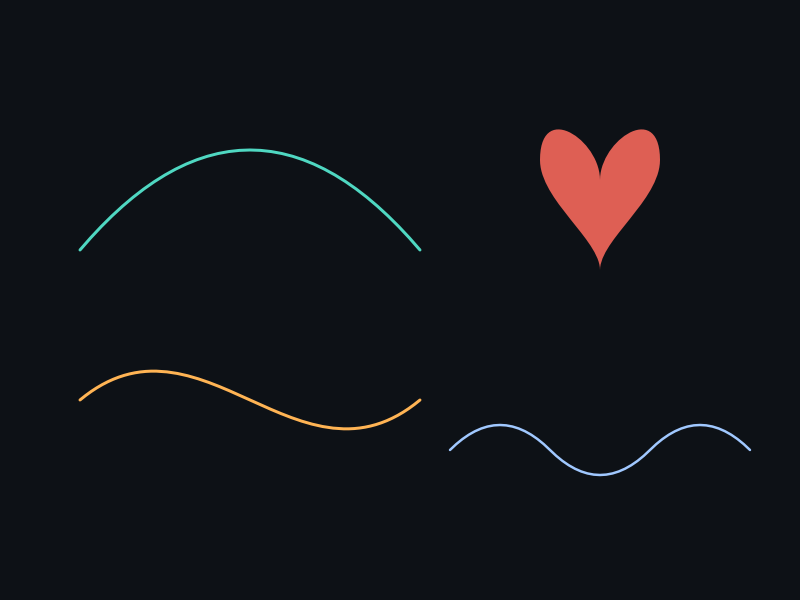
将以下代码保存为 ch37_main.c,编译后运行即可看到二次/三次贝塞尔曲线与心形路径效果:
#include "xge.h"

static int onFrame(void* pUser) {
    (void)pUser;
    xgeClear(0x081114FF);

    // 二次贝塞尔弧线
    xge_shape_ex quad = NULL;
    xgeShapeExCreate(&quad);
    xgeShapeExMoveTo(quad, 80, 250);
    xgeShapeExQuadTo(quad, 400, 20, 720, 250);
    xgeShapeExStrokeColor(quad, 0x4FD8C2FF);
    xgeShapeExStrokeWidth(quad, 3.0f);
    xgeShapeExDraw(quad, 0.25f);
    xgeShapeExDestroy(quad);

    // 三次贝塞尔 S 曲线
    xge_shape_ex s = NULL;
    xgeShapeExCreate(&s);
    xgeShapeExMoveTo(s, 80, 400);
    xgeShapeExCubicTo(s, 250,250, 550,550, 720,400);
    xgeShapeExStrokeColor(s, 0xFFB454FF);
    xgeShapeExStrokeWidth(s, 3.0f);
    xgeShapeExDraw(s, 0.25f);
    xgeShapeExDestroy(s);

    // 心形路径(填充)
    xge_shape_ex heart = NULL;
    xgeShapeExCreate(&heart);
    xgeShapeExMoveTo(heart, 400, 560);
    xgeShapeExCubicTo(heart, 150,400, 180,280, 400,340);
    xgeShapeExCubicTo(heart, 620,280, 650,400, 400,560);
    xgeShapeExClose(heart);
    xgeShapeExFillColor(heart, 0xFF6B5EFF);
    xgeShapeExDraw(heart, 0.25f);
    xgeShapeExDestroy(heart);

    return XGE_OK;
}

int main(void) {
    xge_desc_t d = {0};
    d.iWidth  = 800;
    d.iHeight = 600;
    d.sTitle  = "ch37 - Bezier Curve";
    d.iFlags  = XGE_INIT_VSYNC;
    xgeInit(&d);
    xgeRun(onFrame, NULL);
    xgeUnit();
    return 0;
}
代码讲解
- QuadTo:1 个控制点决定曲线弯曲方向,曲线不经过控制点。
- CubicTo:2 个控制点可表达 S 形曲线,更灵活。
- 心形:两段 CubicTo 拼接 + Close 闭合,形成心形填充区域。
- tolerance:Draw 的 fTolerance=0.25f 控制曲线细分精度,越小越平滑。
要点与陷阱
- 控制点不经过:曲线不经过控制点,控制点只决定曲线"弯曲方向"。
- tolerance 影响精度:Draw 的 fTolerance 越小,曲线越平滑(细分越多),性能越低。
- 连续曲线:多段 CubicTo 连接时,让前段终点 = 后段起点可保证 C0 连续。
- 对称控制点:若控制点关于端点对称,连接处达到 C1 连续(切线方向一致)。
- QuadTo 是 CubicTo 的特例:二次曲线可用三次精确表达。
进阶练习
- 可视化控制点:绘制曲线 + 控制点连线 + 控制点圆形标记。
- 实现一个贝塞尔曲线编辑器:拖拽控制点实时更新曲线。
- 用 CubicTo 近似一个圆(4 段三次曲线,k ≈ 0.5523)。