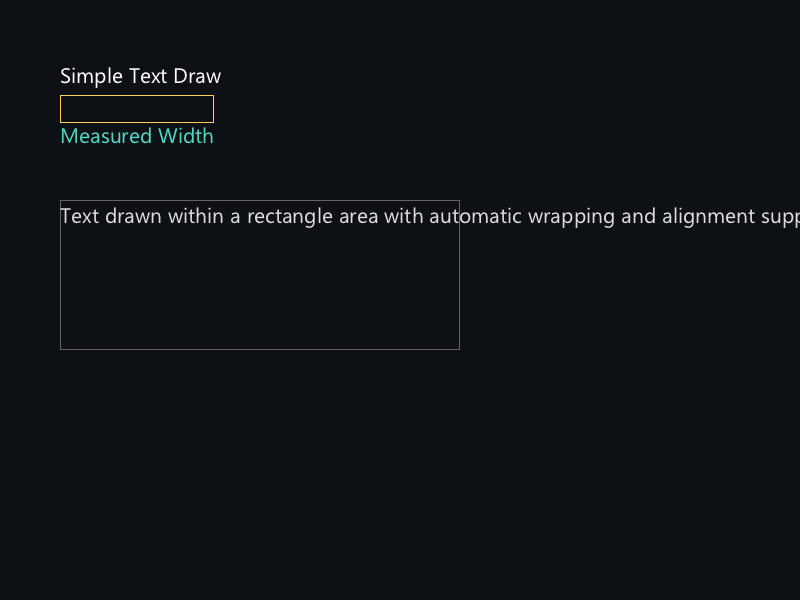
概念
对于大多数场景(HUD、标签、调试信息),无需手动调用 TextShape + GlyphRunDraw。
XGE 提供三个"一步到位"的函数:xgeTextDraw 在指定坐标绘制单行文本,
xgeTextDrawRect 在矩形区域内绘制(支持对齐/换行),
xgeTextMeasure 测量文本像素尺寸。内部自动完成整形与缓存。
API 速查
| 函数 | 说明 |
|---|---|
xge_vec2_t xgeTextMeasure(xge_font pFont, const char* sText) | 测量文本宽高(像素) |
void xgeTextDraw(xge_font pFont, const char* sText, float fX, float fY, uint32_t iColor) | 在 (fX,fY) 绘制单行文本 |
void xgeTextDrawRect(xge_font pFont, const char* sText, xge_rect_t tRect, uint32_t iColor, uint32_t iFlags) | 在矩形区域内绘制文本 |
编译本章示例
gcc -O2 -I. -o ch90.exe ch90_main.c build\xge.lib -lm -lws2_32 -liphlpapi -lgdi32 -luser32 -lshell32 -lopengl32 -lole32 -lwinmm -lavrt
.\ch90.exe
示例:HUD 帧率显示
// 加载字体(只需一次)
xge_font font = NULL;
xgeFontLoad(&font, "Roboto.ttf", 18.0f);

// 每帧绘制 FPS
char buf[64];
snprintf(buf, sizeof(buf), "FPS: %.1f", xgeGetFPS());

// 测量文本宽度(用于右对齐)
xge_vec2_t sz = xgeTextMeasure(font, buf);
float right = (float)xgeGetWidth() - sz.x - 10.0f;

// 绘制到右上角
xgeTextDraw(font, buf, right, 10.0f, 0x4FD8C2FF);

// 矩形区域绘制(自动换行 + 居中)
xge_rect_t rc = { 50, 200, 300, 100 };
xgeTextDrawRect(font,
    "这是一段较长的文本,将在矩形区域内自动换行显示。",
    rc, 0xFFFFFFFF,
    XGE_TEXT_ALIGN_CENTER | XGE_TEXT_CLIP);
完整代码
将以下代码保存为 ch90_main.c,编译后运行即可看到 HUD 帧率显示与文本布局效果:
#include "xge.h"
#include <stdio.h>

static xge_font g_font = NULL;

static int onFrame(void* pUser) {
    (void)pUser;
    xgeClear(0x081114FF);

    // FPS 显示(右上角)
    char buf[64];
    snprintf(buf, sizeof(buf), "FPS: %.1f", xgeGetFPS());
    xge_vec2_t sz = xgeTextMeasure(g_font, buf);
    float right = (float)xgeGetWidth() - sz.x - 10.0f;
    xgeTextDraw(g_font, buf, right, 10.0f, 0x4FD8C2FF);

    // 窗口尺寸信息(左上角)
    snprintf(buf, sizeof(buf), "Window: %dx%d",
        xgeGetWidth(), xgeGetHeight());
    xgeTextDraw(g_font, buf, 10.0f, 10.0f, 0xFFFFFFFF);

    // 矩形区域绘制(自动换行 + 居中)
    xge_rect_t rc = { 50, 200, 300, 100 };
    xgeShapeRectStroke((xge_rect_t){rc.x, rc.y, rc.w, rc.h}, 1.0f, 0x22FFFFFF)
    xgeTextDrawRect(g_font,
        "这是一段较长的文本,将在矩形区域内自动换行显示。",
        rc, 0xFFFFFFFF,
        XGE_TEXT_ALIGN_CENTER | XGE_TEXT_CLIP);

    // 测量文本宽度(居中显示)
    const char* title = "XGE Text Rendering Demo";
    xge_vec2_t tsz = xgeTextMeasure(g_font, title);
    float cx = ((float)xgeGetWidth() - tsz.x) * 0.5f;
    xgeTextDraw(g_font, title, cx, 400.0f, 0xFFCC44FF);

    return XGE_OK;
}

int main(void) {
    xge_desc_t d = {0};
    d.iWidth  = 800;
    d.iHeight = 600;
    d.sTitle  = "ch90 - Text Draw & Measure";
    d.iFlags  = XGE_INIT_VSYNC;
    xgeInit(&d);

    xgeFontLoad(&g_font, "Roboto.ttf", 18.0f);

    xgeRun(onFrame, NULL);

    xgeFontFree(g_font);
    xgeUnit();
    return 0;
}
代码讲解
- TextMeasure:测量单行文本宽高,用于右对齐、居中等布局计算。
- TextDraw:在 (fX,fY) 绘制单行文本,坐标为左上角。
- TextDrawRect:在矩形区域内绘制,支持自动换行和水平对齐(LEFT/CENTER/RIGHT)。
- HUD 模式:每帧重新绘制 FPS 和窗口信息,内部有整形缓存,重复绘制开销极小。
要点与陷阱
- 坐标系:TextDraw 的 (fX, fY) 是文本左上角,非基线。
- Measure:返回单行尺寸;多行文本需自行分割后逐行测量。
- DrawRect Flags:XGE_TEXT_ALIGN_LEFT/CENTER/RIGHT 控制水平对齐;XGE_TEXT_CLIP 超宽裁剪。
- 性能:内部有整形缓存,重复绘制相同文本开销极小。
- vs GlyphRun:需要逐字控制(选区、装饰线、动画)时使用第 88-89 章 API。
进阶练习
- 实现文本按钮:Measure 计算尺寸 → 绘制背景矩形 → TextDraw 居中。
- 实现滚动字幕:每帧偏移 fX,超出屏幕后重置。
- 多语言支持:结合 Fallback 链绘制中英混排文本。