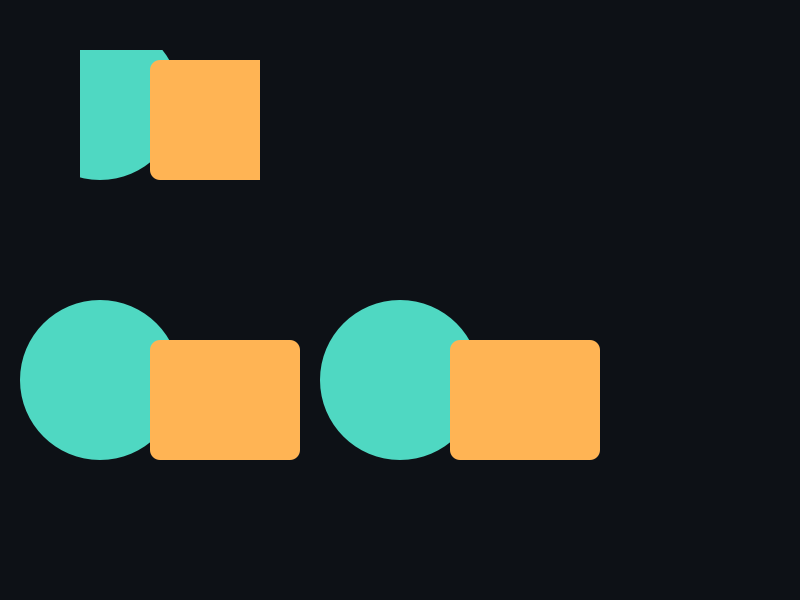
API 速查
| 函数 | 说明 |
|---|---|
int xgeShapeExSceneClipRectSet(xge_shape_ex_scene pScene, xge_rect_t tRect) | 矩形裁剪 |
int xgeShapeExSceneClipRectGet(xge_shape_ex_scene pScene, xge_rect_t* pRect, int* pEnabled) | 查询矩形裁剪 |
int xgeShapeExSceneClipShapeAdd(xge_shape_ex_scene pScene, xge_shape_ex pClipShape) | 添加形状裁剪 |
int xgeShapeExSceneClipShapeAddEx(xge_shape_ex_scene pScene, xge_shape_ex pClipShape, int iMode) | 添加形状裁剪(指定模式) |
int xgeShapeExSceneClipShapeGetCount(xge_shape_ex_scene pScene, int* pCount) | 裁剪形状数量 |
int xgeShapeExSceneClipShapeGetAt(xge_shape_ex_scene pScene, int iIndex, xge_shape_ex* ppClipShape) | 按索引获取 |
int xgeShapeExSceneClipShapeClear(xge_shape_ex_scene pScene) | 清除形状裁剪 |
int xgeShapeExSceneClipClear(xge_shape_ex_scene pScene) | 清除所有裁剪 |
编译本章示例
gcc -O2 -I. -o ch69.exe ch69_main.c build\xge.lib -lm -lws2_32 -liphlpapi -lgdi32 -luser32 -lshell32 -lopengl32 -lole32 -lwinmm -lavrt
.\ch69.exe
示例:ScrollView 视口裁剪
// 滚动内容组
xge_shape_ex_scene scrollContent = NULL;
xgeShapeExSceneCreate(&scrollContent);
// ... 添加大量子元素 ...

// 矩形裁剪:只显示视口区域
xge_rect_t viewport = { 50, 100, 700, 500 };
xgeShapeExSceneClipRectSet(scrollContent, viewport);

// 圆角裁剪:用圆角矩形 Shape
xge_shape_ex clipShape = NULL;
xgeShapeExCreate(&clipShape);
xgeShapeExAppendRect(clipShape,
    50,100, 700,500, 16,16, 1)
xgeShapeExSceneClipShapeAdd(scrollContent, clipShape);
xgeShapeExDestroy(clipShape);

// 清除所有裁剪
xgeShapeExSceneClipClear(scrollContent);
完整代码
将以下代码保存为 ch69_main.c,编译后运行即可看到矩形裁剪 + 滚动动画效果:
#include "xge.h"

static xge_shape_ex_scene g_scroll = NULL;
static float g_fOffset = 0.0f;

static int onFrame(void* pUser) {
    (void)pUser;
    xgeClear(0x081114FF);

    // 模拟滚动:平移内容组
    g_fOffset += 1.0f;
    if (g_fOffset > 400.0f) g_fOffset = 0.0f;
    xge_shape_ex_matrix_t tScroll; xgeShapeExMatrixIdentity(&tScroll);
    xgeShapeExMatrixTranslate(&tScroll, 0.0f, -g_fOffset);
    /* 绘制改用 xgeShapeExSceneDrawEx(g_scroll, 0.25f, &tScroll, 1.0f) */

    // 矩形裁剪:只显示视口区域
    xge_rect_t vp = { 100, 100, 600, 400 };
    xgeShapeExSceneClipRectSet(g_scroll, vp);

    xgeShapeExSceneDraw(g_scroll, 0.25f);

    // 绘制视口边框
    xge_shape_ex border = NULL;
    xgeShapeExCreate(&border);
    xgeShapeExAppendRect(border, 100,100, 600,400, 4,4, 1)
    xgeShapeExStrokeColor(border, 0x4FD8C2FF);
    xgeShapeExStrokeWidth(border, 2.0f);
    xgeShapeExDraw(border, 0.25f);
    xgeShapeExDestroy(border);
    return XGE_OK;
}

int main(void) {
    xge_desc_t d = {0};
    d.iWidth  = 800;
    d.iHeight = 600;
    d.sTitle  = "ch69 - Scene Clip Scroll";
    d.iFlags  = XGE_INIT_VSYNC;
    xgeInit(&d);

    // 构建滚动内容:10 行卡片
    xgeShapeExSceneCreate(&g_scroll);
    for (int i = 0; i < 10; i++) {
        xge_shape_ex card = NULL;
        xgeShapeExCreate(&card);
        xgeShapeExAppendRect(card,
            120, 110+i*80, 560,65, 8,8, 1)
        unsigned int cols[] = {
            0xFF6B5ECC,0xFFB454CC,0x4FD8C2CC,0x7C6BFFCC,0x5EA8FFCC};
        xgeShapeExFillColor(card, cols[i%5]);
        xgeShapeExSceneAdd(g_scroll, card);
        xgeShapeExDestroy(card);
    }

    xgeRun(onFrame, NULL);
    xgeShapeExSceneClipClear(g_scroll);
    xgeShapeExSceneDestroy(g_scroll);
    xgeUnit();
    return 0;
}
代码讲解
- ClipRectSet:设置矩形裁剪区域,超出视口的内容不会被渲染(硬件 scissor,性能优秀)。
- SceneTranslate:每帧平移内容组模拟滚动,裁剪区域固定不动,内容在裁剪窗口内移动。
- 视口边框:用独立的 Shape 绘制裁剪区域边框,帮助用户理解裁剪范围。
- ClipClear:退出前清除裁剪,避免影响后续渲染。
要点与陷阱
- 矩形 vs 形状:ClipRect 高效(硬件 scissor),ClipShape 更灵活但开销大。
- 多裁剪叠加:多个 ClipShape 取交集(AND 逻辑)。
- 坐标系:裁剪区域在 Scene 局部坐标中定义,随 Scene 变换移动。
- ClipClear:同时清除矩形和形状裁剪。
进阶练习
- 实现圆形头像裁剪:ClipShape 用圆形。
- 实现滚动列表:每帧更新 ClipRect 位置模拟滚动。