API 速查
| 函数 | 说明 |
|---|---|
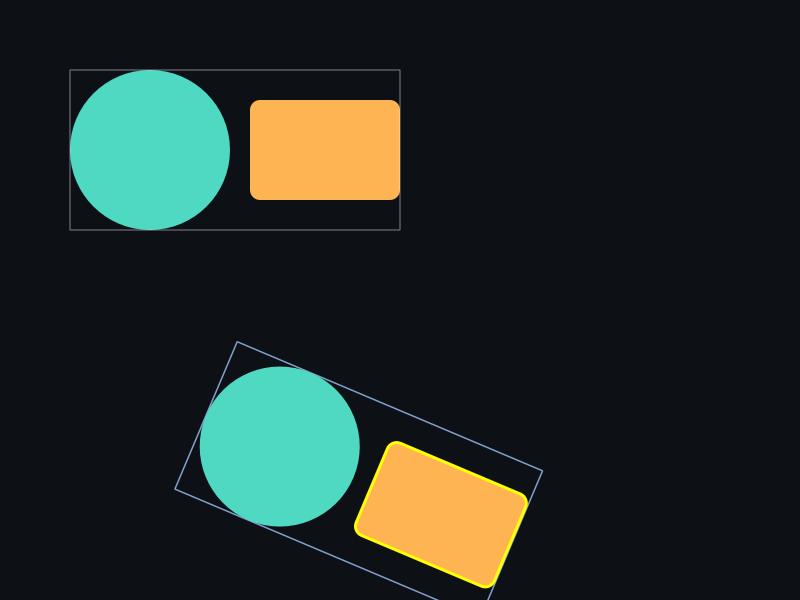
int xgeShapeExSceneGetBounds(xge_shape_ex_scene pScene, float fTolerance, xge_rect_t* pBounds) | 轴对齐包围盒 |
int xgeShapeExSceneGetOBB(xge_shape_ex_scene pScene, float fTolerance, xge_vec2_t* pPoints4) | 有向包围盒(4 顶点) |
int xgeShapeExSceneContainsPoint(xge_shape_ex_scene pScene, float fX, float fY, float fTolerance, int* pContains) | 点是否在场景内 |
int xgeShapeExSceneHitTest(xge_shape_ex_scene pScene, float fX, float fY, float fTolerance, xge_shape_ex* ppShape) | 命中测试(返回 Shape) |
int xgeShapeExSceneDraw(xge_shape_ex_scene pScene, float fTolerance) | 绘制场景 |
int xgeShapeExSceneDrawPx(xge_shape_ex_scene pScene, float fTolerance) | 像素对齐绘制 |
int xgeShapeExSceneDrawEx(xge_shape_ex_scene pScene, float fTolerance, const xge_shape_ex_matrix_t* pParentMatrix, float fParentOpacity) | 带父变换绘制 |
int xgeShapeExSceneDrawPxEx(xge_shape_ex_scene pScene, float fTolerance, const xge_shape_ex_matrix_t* pParentMatrix, float fParentOpacity) | 像素对齐 + 父变换 |
编译本章示例
gcc -O2 -I. -o ch72.exe ch72_main.c build\xge.lib -lm -lws2_32 -liphlpapi -lgdi32 -luser32 -lshell32 -lopengl32 -lole32 -lwinmm -lavrt
.\ch72.exe
示例:鼠标拾取场景中的图形
// 获取场景包围盒
xge_rect_t bounds;
xgeShapeExSceneGetBounds(root, 0.25f, &bounds);

// 鼠标点击命中测试
void OnMouseClick(float mx, float my) {
    xge_shape_ex hitShape = NULL;
    xgeShapeExSceneHitTest(root, mx, my,
        0.25f, &hitShape);
    if (hitShape) {
        // 命中!高亮该 Shape
        xgeShapeExStrokeColor(hitShape, 0xFF6B5EFF);
        xgeShapeExStrokeWidth(hitShape, 2.0f);
    }
}

// 绘制整棵场景树
xgeShapeExSceneDraw(root, 0.25f);

// 嵌套绘制:传入父级累积变换
xge_shape_ex_matrix_t parentMtx;
xgeShapeExMatrixIdentity(&parentMtx);
xgeShapeExSceneDrawEx(child, 0.25f,
    &parentMtx, 1.0f);
完整代码
将以下代码保存为 ch72_main.c,编译后运行即可看到鼠标点击拾取 + 高亮效果:
#include "xge.h"

static xge_shape_ex_scene g_root = NULL;
static xge_shape_ex g_pHit = NULL;

static int onFrame(void* pUser) {
    (void)pUser;
    xgeClear(0x081114FF);

    // 获取鼠标位置并做命中测试
    float mx, my;
    xgeMouseGet(&mx, &my);
    xge_shape_ex hit = NULL;
    xgeShapeExSceneHitTest(g_root, (float)mx, (float)my,
        0.25f, &hit);
    g_pHit = hit;

    xgeShapeExSceneDraw(g_root, 0.25f);

    // 高亮命中的 Shape
    if (g_pHit) {
        xgeShapeExStrokeColor(g_pHit, 0xFF6B5EFF);
        xgeShapeExStrokeWidth(g_pHit, 3.0f);
        xgeShapeExDraw(g_pHit, 0.25f);
    }
    return XGE_OK;
}

int main(void) {
    xge_desc_t d = {0};
    d.iWidth  = 800;
    d.iHeight = 600;
    d.sTitle  = "ch72 - HitTest";
    d.iFlags  = XGE_INIT_VSYNC;
    xgeInit(&d);

    // 构建场景:多个图形
    xgeShapeExSceneCreate(&g_root);
    for (int i = 0; i < 5; i++) {
        xge_shape_ex s = NULL;
        xgeShapeExCreate(&s);
        if (i % 2 == 0)
            xgeShapeExAppendCircle(s, 150+i*130, 300, 50, 1);
        else
            xgeShapeExAppendRect(s,
                100+i*130,250, 100,100, 8,8, 1)
        unsigned int cols[] = {
            0xFF6B5EFF,0xFFB454FF,0x4FD8C2FF,0x7C6BFFFF,0x5EA8FFCC};
        xgeShapeExFillColor(s, cols[i]);
        xgeShapeExSceneAdd(g_root, s);
        xgeShapeExDestroy(s);
    }

    xgeRun(onFrame, NULL);
    xgeShapeExSceneDestroy(g_root);
    xgeUnit();
    return 0;
}
代码讲解
- HitTest:每帧用鼠标坐标对场景树做命中测试,返回最上层的 Shape 指针。
- 高亮反馈:命中的 Shape 额外绘制红色描边,提供视觉反馈。
- fTolerance:命中测试与绘制使用相同的展平精度 0.25,保证拾取与视觉一致。
- 场景构建:5 个交替的圆形/圆角矩形,展示不同图形的拾取。
要点与陷阱
- fTolerance:曲线展平精度,与 Draw 时保持一致(推荐 0.25)。
- HitTest 返回最上层:按绘制顺序逆序检测,返回第一个命中的 Shape。
- ContainsPoint vs HitTest:前者只返回 bool,后者返回具体 Shape 指针。
- DrawEx:用于嵌套场景,父级变换和透明度自动累积到子树。
- GetOBB:返回 4 个顶点(旋转后的包围盒),适合碰撞检测。
进阶练习
- 实现选择框:拖拽矩形与 GetBounds 做相交测试实现框选。
- 实现拖拽:HitTest 拾取 → 记录偏移 → 每帧 TransformTranslate。