API 速查
| 函数 | 说明 |
|---|---|
int xgeShapeExFillRadialGradient(xge_shape_ex pShape, float fCX, float fCY, float fRadius, float fFX, float fFY, int iUnits, const xge_shape_ex_color_stop_t* pStops, int iStopCount) | 径向渐变(圆心+焦点) |
int xgeShapeExFillRadialGradientEx(xge_shape_ex pShape, float fCX, float fCY, float fRadius, float fFX, float fFY, float fFocalRadius, int iUnits, const ...* pStops, int iStopCount) | 径向渐变(含焦点半径) |
编译本章示例
gcc -O2 -I. -o ch43.exe ch43_main.c build\xge.lib -lm -lws2_32 -liphlpapi -lgdi32 -luser32 -lshell32 -lopengl32 -lole32 -lwinmm -lavrt
.\ch43.exe
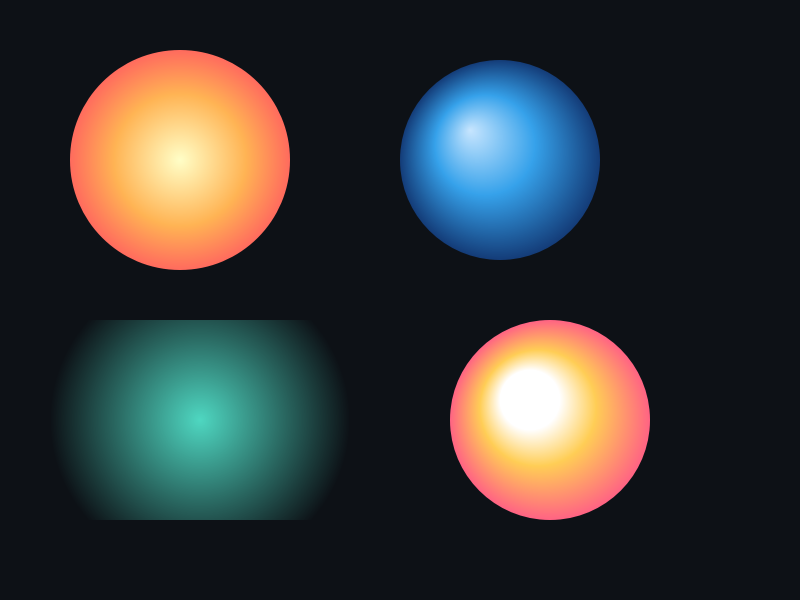
示例 1:球体高光
xge_shape_ex_color_stop_t stops[] = {
    { 0.0f, 0xFFFFFFFF },  // 中心白
    { 0.3f, 0x4FD8C2FF },  // 过渡
    { 1.0f, 0x0A3040FF },  // 边缘暗
};

xge_shape_ex ball = NULL;
xgeShapeExCreate(&ball);
xgeShapeExAppendCircle(ball, 400, 300, 120, 120, 1);

// 焦点偏左上 → 模拟光源
xgeShapeExFillRadialGradient(ball,
    400, 300, 120,   // 圆心 + 半径
    360, 260,          // 焦点(偏左上)
    XGE_SHAPE_EX_GRADIENT_USER_SPACE,
    stops, 3);

xgeShapeExDraw(ball, 0.25f);
示例 2:发光效果
xge_shape_ex_color_stop_t glow[] = {
    { 0.0f, 0xFFB454FF },
    { 0.5f, 0xFFB45440 },
    { 1.0f, 0xFFB45400 },  // 完全透明
};

xgeShapeExFillRadialGradient(shape,
    400, 300, 200, 400, 300,
    XGE_SHAPE_EX_GRADIENT_USER_SPACE,
    glow, 3);
完整代码
将以下代码保存为 ch43_main.c,编译后运行即可看到径向渐变的球体高光与发光效果:
#include "xge.h"

static int onFrame(void* pUser) {
    (void)pUser;
    xgeClear(0x081114FF);

    // 球体高光(焦点偏左上)
    xge_shape_ex_color_stop_t ball_stops[] = {
        { 0.0f, 0xFFFFFFFF },
        { 0.3f, 0x4FD8C2FF },
        { 1.0f, 0x0A3040FF },
    };
    xge_shape_ex ball = NULL;
    xgeShapeExCreate(&ball);
    xgeShapeExAppendCircle(ball, 250, 280, 120, 120, 1);
    xgeShapeExFillRadialGradient(ball,
        250, 280, 120, 210, 240,
        XGE_SHAPE_EX_GRADIENT_USER_SPACE,
        ball_stops, 3);
    xgeShapeExDraw(ball, 0.25f);
    xgeShapeExDestroy(ball);

    // 发光效果(边缘透明)
    xge_shape_ex_color_stop_t glow[] = {
        { 0.0f, 0xFFB454FF },
        { 0.5f, 0xFFB45440 },
        { 1.0f, 0xFFB45400 },
    };
    xge_shape_ex g = NULL;
    xgeShapeExCreate(&g);
    xgeShapeExAppendCircle(g, 580, 280, 150, 150, 1);
    xgeShapeExFillRadialGradient(g,
        580, 280, 150, 580, 280,
        XGE_SHAPE_EX_GRADIENT_USER_SPACE,
        glow, 3);
    xgeShapeExDraw(g, 0.25f);
    xgeShapeExDestroy(g);

    return XGE_OK;
}

int main(void) {
    xge_desc_t d = {0};
    d.iWidth  = 800;
    d.iHeight = 600;
    d.sTitle  = "ch43 - Radial Gradient";
    d.iFlags  = XGE_INIT_VSYNC;
    xgeInit(&d);
    xgeRun(onFrame, NULL);
    xgeUnit();
    return 0;
}
代码讲解
- 球体高光:焦点偏左上模拟光源,中心白→边缘暗产生 3D 球体感。
- 发光效果:边缘 Alpha 渐变为 0,形成光晕扩散。
- 圆心 vs 焦点:(CX,CY) 是外圈圆心,(FX,FY) 是颜色起始焦点。
- 焦点=圆心:对称径向渐变(同心圆)。
要点与陷阱
- 圆心 vs 焦点:(CX,CY) 是渐变外圈圆心,(FX,FY) 是颜色起始焦点。
- 焦点 = 圆心:对称径向渐变(同心圆)。
- Ex 版本:额外支持 fFocalRadius(焦点也有半径)。
- 超出半径:由扩散模式(第 44 章)决定。
进阶练习
- 实现一个 3D 球体:径向渐变 + 高光偏移。
- 动态移动焦点位置,模拟光源旋转。