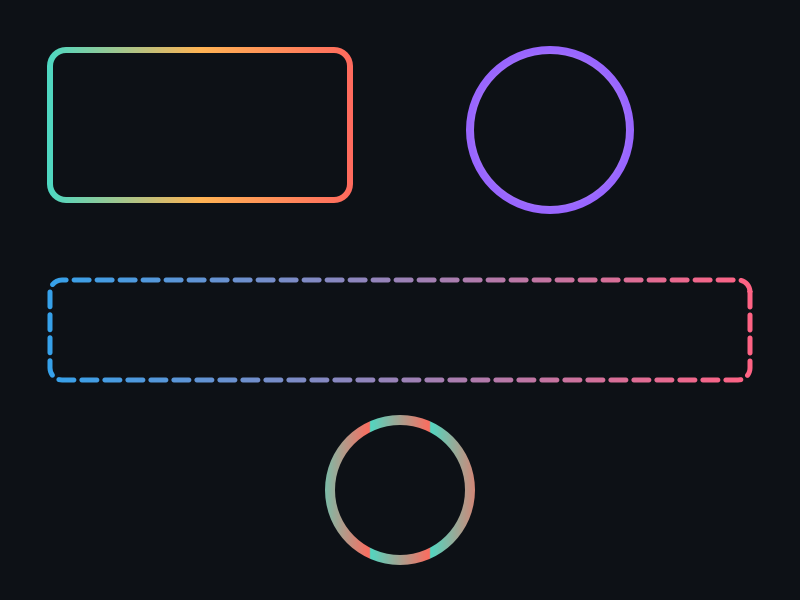
概念
- 描边渐变:与填充渐变 API 对称,参数完全一致。
- 独立控制:描边渐变有自己的 Spread 和 Transform,不影响填充渐变。
- 覆盖关系:StrokeLinearGradient / StrokeColor 互斥,后设置的生效。
API 速查
| 函数 | 说明 |
|---|---|
int xgeShapeExStrokeLinearGradient(xge_shape_ex pShape, float fX1, float fY1, float fX2, float fY2, int iUnits, const xge_shape_ex_color_stop_t* pStops, int iStopCount) | 描边线性渐变 |
int xgeShapeExStrokeRadialGradient(xge_shape_ex pShape, float fCX, float fCY, float fRadius, float fFX, float fFY, int iUnits, const ...* pStops, int iStopCount) | 描边径向渐变 |
int xgeShapeExStrokeRadialGradientEx(xge_shape_ex pShape, ..., float fFocalRadius, ...) | 描边径向渐变(含焦点半径) |
int xgeShapeExStrokeGradientSpread(xge_shape_ex pShape, int iSpread) | 描边渐变扩散模式 |
int xgeShapeExStrokeGradientTransformSet(xge_shape_ex pShape, const xge_shape_ex_matrix_t* pMatrix) | 描边渐变变换 |
int xgeShapeExStrokeGradientTransformIdentity(xge_shape_ex pShape) | 重置描边渐变变换 |
编译本章示例
gcc -O2 -I. -o ch50.exe ch50_main.c build\xge.lib -lm -lws2_32 -liphlpapi -lgdi32 -luser32 -lshell32 -lopengl32 -lole32 -lwinmm -lavrt
.\ch50.exe
示例 1:彩虹边框
xge_shape_ex_color_stop_t rainbow[] = {
    { 0.0f,  0xFF0000FF },
    { 0.25f, 0xFFFF00FF },
    { 0.5f,  0x00FF00FF },
    { 0.75f, 0x0000FFFF },
    { 1.0f,  0xFF00FFFF },
};

xge_shape_ex shape = NULL;
xgeShapeExCreate(&shape);
xgeShapeExAppendRect(shape, 100,100, 600,400, 24,24, 1);

// 填充深色背景
xgeShapeExFillColor(shape, 0x1A1A2EFF);

// 描边使用彩虹渐变
xgeShapeExStrokeLinearGradient(shape,
    0,0, 1,1,  // 对角线方向
    XGE_SHAPE_EX_GRADIENT_OBJECT_BOUNDING_BOX,
    rainbow, 5);
xgeShapeExStrokeWidth(shape, 6.0f);

xgeShapeExDraw(shape, 0.25f);
示例 2:描边渐变 + 旋转动画
static float s_fAngle = 0.0f;

void OnFrame(void) {
    s_fAngle += 2.0f;

    xge_shape_ex_matrix_t m;
    xgeShapeExMatrixIdentity(&m);
    xgeShapeExMatrixRotate(&m, s_fAngle);
    xgeShapeExStrokeGradientTransformSet(g_shape, &m);

    xgeShapeExDraw(g_shape, 0.25f);
}
完整代码
将以下代码保存为 ch50_main.c,编译后运行即可看到描边渐变与旋转动画效果:
#include "xge.h"

static float s_fAngle = 0.0f;

static int onFrame(void* pUser) {
    (void)pUser;
    xgeClear(0x081114FF);
    s_fAngle += 2.0f;

    xge_shape_ex_color_stop_t rainbow[] = {
        { 0.0f,  0xFF0000FF },
        { 0.25f, 0xFFFF00FF },
        { 0.5f,  0x00FF00FF },
        { 0.75f, 0x0000FFFF },
        { 1.0f,  0xFF00FFFF },
    };

    xge_shape_ex shape = NULL;
    xgeShapeExCreate(&shape);
    xgeShapeExAppendRect(shape, 100,100, 600,400, 24,24, 1);
    xgeShapeExFillColor(shape, 0x1A1A2EFF);

    // 描边彩虹渐变(对角线方向)
    xgeShapeExStrokeLinearGradient(shape,
        0,0, 1,1,
        XGE_SHAPE_EX_GRADIENT_OBJECT_BOUNDING_BOX,
        rainbow, 5);
    xgeShapeExStrokeWidth(shape, 6.0f);

    // 旋转描边渐变坐标系
    xge_shape_ex_matrix_t m;
    xgeShapeExMatrixIdentity(&m);
    xgeShapeExMatrixRotate(&m, s_fAngle);
    xgeShapeExStrokeGradientTransformSet(shape, &m);

    xgeShapeExDraw(shape, 0.25f);
    xgeShapeExDestroy(shape);
    return XGE_OK;
}

int main(void) {
    xge_desc_t d = {0};
    d.iWidth  = 800;
    d.iHeight = 600;
    d.sTitle  = "ch50 - Stroke Gradient";
    d.iFlags  = XGE_INIT_VSYNC;
    xgeInit(&d);
    xgeRun(onFrame, NULL);
    xgeUnit();
    return 0;
}
代码讲解
- rainbow 色标:5 个色标实现彩虹渐变(红→黄→绿→蓝→紫)。
- StrokeLinearGradient:与填充渐变 API 类似,但作用于描边。
- 对角线方向:(0,0)→(1,1) 在 BOUNDING_BOX 模式下为对角线。
- StrokeGradientTransformSet:旋转描边渐变坐标系,实现“流光边框”动画。
- 与填充渐变独立:可同时拥有填充渐变 + 描边渐变。
要点与陷阱
- 与填充渐变独立:可同时拥有填充渐变 + 描边渐变。
- StrokeColor 覆盖:调用 StrokeColor 会清除描边渐变(反之亦然)。
- Spread 独立:StrokeGradientSpread 不影响 FillGradientSpread。
- 宽描边效果明显:描边太细时渐变不易观察,建议 Width ≥ 4。
进阶练习
- 实现"流光边框":Repeat 扩散 + 动态 Transform 旋转。
- 径向渐变描边圆环,模拟金属环反光效果。