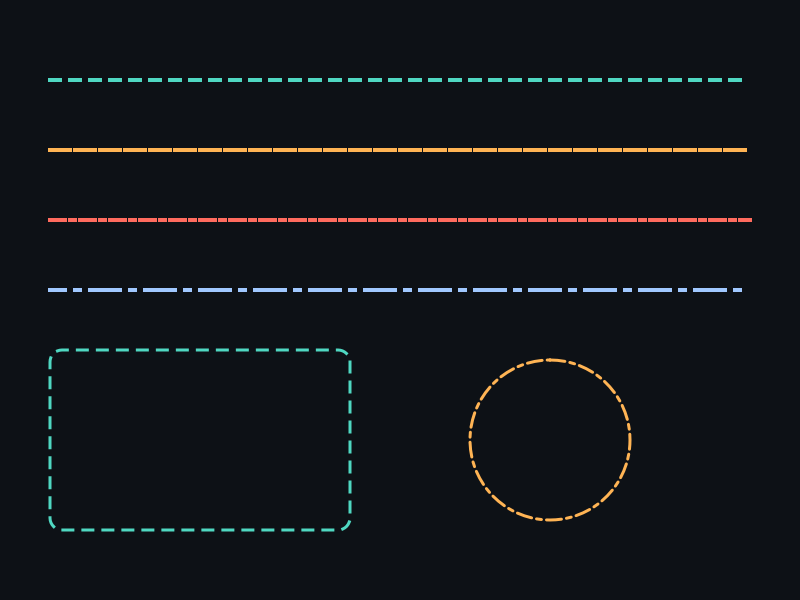
概念
- Dash 数组:[画线长, 间隔长, 画线长, 间隔长, ...],奇数个时自动翻倍。
- Offset:虚线起始偏移,动态改变可实现"蚂蚁线"动画。
- 清除虚线:传入 NULL / 0 恢复实线。
API 速查
| 函数 | 说明 |
|---|---|
int xgeShapeExStrokeDash(xge_shape_ex pShape, const float* pDashPattern, int iDashCount, float fDashOffset) | 设置虚线模式 |
int xgeShapeExStrokeDashGet(xge_shape_ex pShape, const float** ppDashPattern, int* pDashCount, float* pDashOffset) | 获取虚线参数 |
编译本章示例
gcc -O2 -I. -o ch49.exe ch49_main.c build\xge.lib -lm -lws2_32 -liphlpapi -lgdi32 -luser32 -lshell32 -lopengl32 -lole32 -lwinmm -lavrt
.\ch49.exe
示例 1:基础虚线
xge_shape_ex shape = NULL;
xgeShapeExCreate(&shape);
xgeShapeExMoveTo(shape, 100, 300);
xgeShapeExLineTo(shape, 700, 300);

xgeShapeExStrokeColor(shape, 0x4FD8C2FF);
xgeShapeExStrokeWidth(shape, 4.0f);

// 虚线:画 20px,空 10px
float dash[] = { 20.0f, 10.0f };
xgeShapeExStrokeDash(shape, dash, 2, 0.0f);

xgeShapeExDraw(shape, 0.25f);
示例 2:蚂蚁线动画
static float s_fOffset = 0.0f;

void OnFrame(void) {
    s_fOffset += 0.5f;
    if (s_fOffset >= 30.0f) s_fOffset -= 30.0f;

    float dash[] = { 15.0f, 15.0f };
    xgeShapeExStrokeDash(g_shape, dash, 2, s_fOffset);
    xgeShapeExDraw(g_shape, 0.25f);
}
示例 3:点划线
// 点划线:长画 20, 空 5, 点 2, 空 5
float dashDot[] = { 20.0f, 5.0f, 2.0f, 5.0f };
xgeShapeExStrokeDash(shape, dashDot, 4, 0.0f);
xgeShapeExStrokeCap(shape, XGE_SHAPE_EX_CAP_ROUND);
完整代码
将以下代码保存为 ch49_main.c,编译后运行即可看到虚线模式与蚤蚁线动画效果:
#include "xge.h"

static float s_fOffset = 0.0f;

static int onFrame(void* pUser) {
    (void)pUser;
    xgeClear(0x081114FF);

    // 蚤蚁线动画:动态 Offset
    s_fOffset += 0.5f;
    if (s_fOffset >= 30.0f) s_fOffset -= 30.0f;

    // 矩形选区边框
    xge_shape_ex sel = NULL;
    xgeShapeExCreate(&sel);
    xgeShapeExAppendRect(sel, 100,80, 600,200, 8,8, 1);
    xgeShapeExStrokeColor(sel, 0x4FD8C2FF);
    xgeShapeExStrokeWidth(sel, 3.0f);
    float dash[] = { 15.0f, 15.0f };
    xgeShapeExStrokeDash(sel, dash, 2, s_fOffset);
    xgeShapeExDraw(sel, 0.25f);
    xgeShapeExDestroy(sel);

    // 点划线:长画 20, 空 5, 点 2, 空 5
    xge_shape_ex dl = NULL;
    xgeShapeExCreate(&dl);
    xgeShapeExMoveTo(dl, 100, 380);
    xgeShapeExLineTo(dl, 700, 380);
    xgeShapeExStrokeColor(dl, 0xFFB454FF);
    xgeShapeExStrokeWidth(dl, 3.0f);
    xgeShapeExStrokeCap(dl, XGE_SHAPE_EX_CAP_ROUND);
    float dashDot[] = { 20.0f, 5.0f, 2.0f, 5.0f };
    xgeShapeExStrokeDash(dl, dashDot, 4, 0.0f);
    xgeShapeExDraw(dl, 0.25f);
    xgeShapeExDestroy(dl);

    // 圆点虚线:Round Cap + 短画线
    xge_shape_ex dot = NULL;
    xgeShapeExCreate(&dot);
    xgeShapeExMoveTo(dot, 100, 480);
    xgeShapeExLineTo(dot, 700, 480);
    xgeShapeExStrokeColor(dot, 0x4FD8C2FF);
    xgeShapeExStrokeWidth(dot, 6.0f);
    xgeShapeExStrokeCap(dot, XGE_SHAPE_EX_CAP_ROUND);
    float dots[] = { 0.1f, 18.0f };
    xgeShapeExStrokeDash(dot, dots, 2, 0.0f);
    xgeShapeExDraw(dot, 0.25f);
    xgeShapeExDestroy(dot);
    return XGE_OK;
}

int main(void) {
    xge_desc_t d = {0};
    d.iWidth  = 800;
    d.iHeight = 600;
    d.sTitle  = "ch49 - Dash Pattern";
    d.iFlags  = XGE_INIT_VSYNC;
    xgeInit(&d);
    xgeRun(onFrame, NULL);
    xgeUnit();
    return 0;
}
代码讲解
- Dash 数组:交替指定“画”和“空”的长度,如 {15,15} 表示画 15px 空 15px。
- Offset 动画:每帧增加 Offset,对 dash 总和取模实现无缝循环(蚤蚁线)。
- 点划线:4 元素数组 {20,5,2,5} 实现“长画-空-点-空”循环。
- 圆点虚线:极短画线(0.1) + Round Cap = 圆点效果。
- 清除虚线:传入 NULL/0 恢复实线。
要点与陷阱
- 奇数数组:如 {10, 5, 2} 会被内部翻倍为 {10, 5, 2, 10, 5, 2}。
- 清除虚线:
xgeShapeExStrokeDash(shape, NULL, 0, 0)恢复实线。 - 配合 Cap:Round Cap + 短画线 = 圆点虚线。
- Offset 循环:Offset 对 (所有 dash 之和) 取模即可无缝循环。
进阶练习
- 实现选区边框的蚂蚁线动画(矩形路径 + 动态 Offset)。
- 用不同 Dash 数组模拟 CSS 的 dashed / dotted / dash-dot 样式。