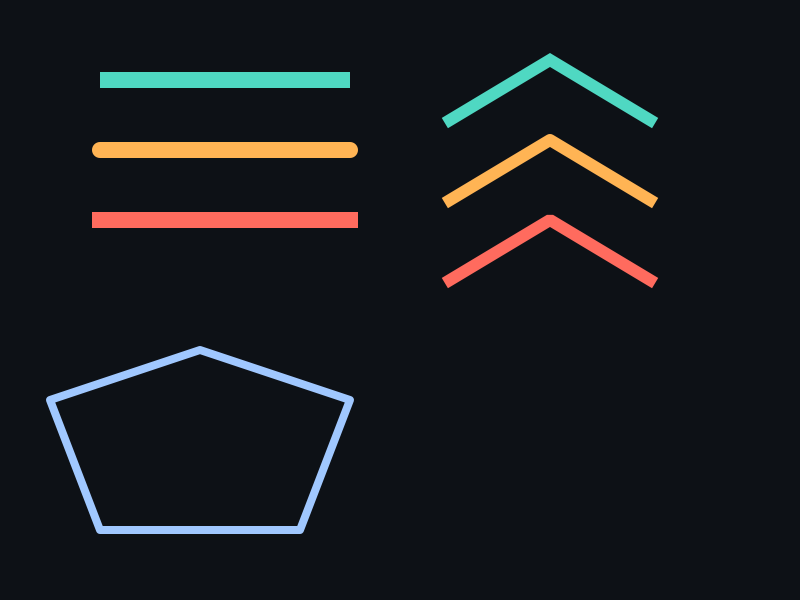
概念
- Cap(端帽):Butt(平切)、Round(圆头)、Square(方头延伸)。
- Join(连接):Miter(尖角)、Round(圆角)、Bevel(斜切)。
- 仅开放路径:闭合路径没有端帽,只有连接。
API 速查
| 常量 / 函数 | 说明 |
|---|---|
#define XGE_SHAPE_EX_CAP_BUTT 0 | 平切端帽 |
#define XGE_SHAPE_EX_CAP_ROUND 1 | 圆形端帽 |
#define XGE_SHAPE_EX_CAP_SQUARE 2 | 方形端帽 |
#define XGE_SHAPE_EX_JOIN_MITER 0 | 尖角连接 |
#define XGE_SHAPE_EX_JOIN_ROUND 1 | 圆角连接 |
#define XGE_SHAPE_EX_JOIN_BEVEL 2 | 斜切连接 |
int xgeShapeExStrokeCap(xge_shape_ex pShape, int iCap) | 设置端帽样式 |
int xgeShapeExStrokeCapGet(xge_shape_ex pShape, int* pCap) | 获取端帽样式 |
int xgeShapeExStrokeJoin(xge_shape_ex pShape, int iJoin) | 设置连接样式 |
int xgeShapeExStrokeJoinGet(xge_shape_ex pShape, int* pJoin) | 获取连接样式 |
编译本章示例
gcc -O2 -I. -o ch47.exe ch47_main.c build\xge.lib -lm -lws2_32 -liphlpapi -lgdi32 -luser32 -lshell32 -lopengl32 -lole32 -lwinmm -lavrt
.\ch47.exe
示例:三种端帽 + 三种连接对比
int caps[]  = { XGE_SHAPE_EX_CAP_BUTT, XGE_SHAPE_EX_CAP_ROUND, XGE_SHAPE_EX_CAP_SQUARE };
int joins[] = { XGE_SHAPE_EX_JOIN_MITER, XGE_SHAPE_EX_JOIN_ROUND, XGE_SHAPE_EX_JOIN_BEVEL };

for (int i = 0; i < 3; i++) {
    xge_shape_ex s = NULL;
    xgeShapeExCreate(&s);

    // 开放折线路径
    xgeShapeExMoveTo(s, 100, 100+i*150);
    xgeShapeExLineTo(s, 350, 50+i*150);
    xgeShapeExLineTo(s, 600, 100+i*150);

    xgeShapeExStrokeColor(s, 0x4FD8C2FF);
    xgeShapeExStrokeWidth(s, 12.0f);
    xgeShapeExStrokeCap(s, caps[i]);
    xgeShapeExStrokeJoin(s, joins[i]);
    xgeShapeExDraw(s, 0.25f);
    xgeShapeExDestroy(s);
}
完整代码
将以下代码保存为 ch47_main.c,编译后运行即可看到端帽与连接样式对比:
#include "xge.h"

static int onFrame(void* pUser) {
    (void)pUser;
    xgeClear(0x081114FF);

    int caps[]  = { XGE_SHAPE_EX_CAP_BUTT, XGE_SHAPE_EX_CAP_ROUND, XGE_SHAPE_EX_CAP_SQUARE };
    int joins[] = { XGE_SHAPE_EX_JOIN_MITER, XGE_SHAPE_EX_JOIN_ROUND, XGE_SHAPE_EX_JOIN_BEVEL };

    for (int i = 0; i < 3; i++) {
        xge_shape_ex s = NULL;
        xgeShapeExCreate(&s);

        // 开放折线路径
        xgeShapeExMoveTo(s, 100, 100+i*160);
        xgeShapeExLineTo(s, 350, 50+i*160);
        xgeShapeExLineTo(s, 600, 100+i*160);

        xgeShapeExStrokeColor(s, 0x4FD8C2FF);
        xgeShapeExStrokeWidth(s, 14.0f);
        xgeShapeExStrokeCap(s, caps[i]);
        xgeShapeExStrokeJoin(s, joins[i]);
        xgeShapeExDraw(s, 0.25f);
        xgeShapeExDestroy(s);
    }
    return XGE_OK;
}

int main(void) {
    xge_desc_t d = {0};
    d.iWidth  = 800;
    d.iHeight = 600;
    d.sTitle  = "ch47 - Cap & Join";
    d.iFlags  = XGE_INIT_VSYNC;
    xgeInit(&d);
    xgeRun(onFrame, NULL);
    xgeUnit();
    return 0;
}
代码讲解
- caps/joins 数组:分别存储三种端帽和三种连接常量,循环中逐一应用。
- MoveTo + LineTo:构建开放折线(V 形),有端点和拐点,能同时展示 Cap 和 Join。
- StrokeCap:控制开放路径端点的形状(Butt/Round/Square)。
- StrokeJoin:控制路径拐点处的连接方式(Miter/Round/Bevel)。
- 闭合路径无 Cap:Close 后起点/终点交汇处使用 Join,不显示端帽。
要点与陷阱
- 默认值:Cap = Butt,Join = Miter。
- Square vs Butt:Square 会在线段端点外延伸 Width/2。
- Miter 尖刺:锐角时 Miter 会产生很长尖角,用 MiterLimit 限制(第 48 章)。
- 闭合路径:Close 后没有端帽,起点/终点交汇处使用 Join。
进阶练习
- 绘制一条虚线(第 49 章)+ Round Cap,实现"圆点虚线"。
- 用 Bevel Join 绘制箭头形状,观察斜切效果。