API 速查
| 函数 | 说明 |
|---|---|
int xgeSvgSetPreserveAspectRatio(xge_svg pSvg, const char* sValue) | 设置(SVG 语法字符串) |
int xgeSvgGetPreserveAspectRatio(xge_svg pSvg, int* pAlignX, int* pAlignY, int* pMeetOrSlice) | 获取对齐参数 |
int xgeSvgGetDrawViewport(xge_svg pSvg, xge_rect_t tDst, xge_rect_t* pViewport) | 计算实际绘制视口 |
编译本章示例
gcc -O2 -I. -o ch76.exe ch76_main.c build\xge.lib -lm -lws2_32 -liphlpapi -lgdi32 -luser32 -lshell32 -lopengl32 -lole32 -lwinmm -lavrt
.\ch76.exe
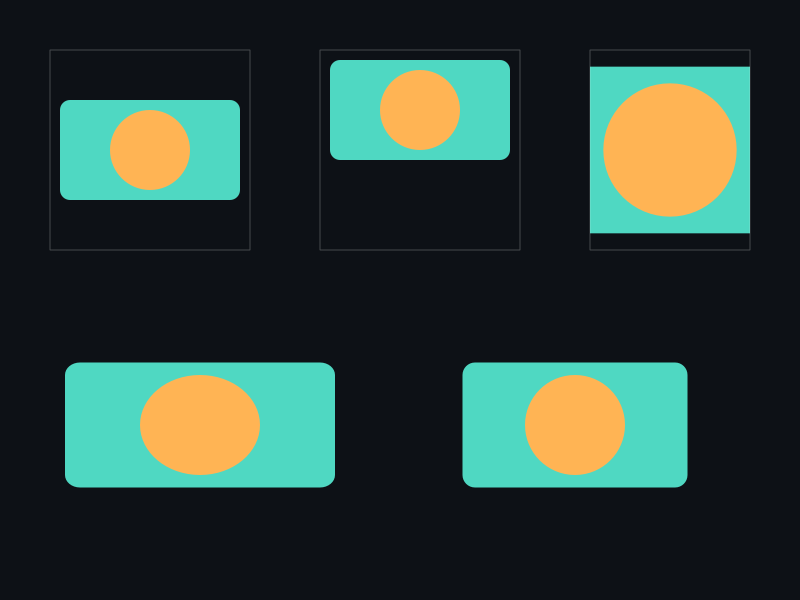
示例:不同对齐模式
xge_svg bg = NULL;
xgeSvgCreate(&bg);
xgeSvgLoad(bg, "assets/bg.svg");

// 拉伸填满(不保持比例)
xgeSvgSetPreserveAspectRatio(bg, "none");

// 居中裁切(保持比例,填满区域)
xgeSvgSetPreserveAspectRatio(bg, "xMidYMid slice");

// 左上对齐,完整显示(默认)
xgeSvgSetPreserveAspectRatio(bg, "xMinYMin meet");

// 查询当前设置
int ax, ay, ms;
xgeSvgGetPreserveAspectRatio(bg, &ax, &ay, &ms);

// 计算实际绘制区域
xge_rect_t dst = { 0,0, 800,600 };
xge_rect_t vp;
xgeSvgGetDrawViewport(bg, dst, &vp);
完整代码
将以下代码保存为 ch76_main.c,编译后运行即可看到三种对齐模式的对比效果:
#include "xge.h"

static xge_svg g_svg = NULL;
static int g_iMode = 0;
static int g_iFrame = 0;

static const char* g_modes[] = {
    "xMidYMid meet",
    "xMidYMid slice",
    "none"
};

static int onFrame(void* pUser) {
    (void)pUser;
    xgeClear(0x081114FF);
    g_iFrame++;

    // 每 120 帧切换模式
    g_iMode = (g_iFrame / 120) % 3;
    xgeSvgSetPreserveAspectRatio(g_svg, g_modes[g_iMode]);

    // 绘制到宽矩形(非等比)
    xge_rect_t dst = { 150, 150, 500, 300 };
    xgeSvgDraw(g_svg, dst, 0.25f);

    // 绘制目标区域边框
    xge_shape_ex border = NULL;
    xgeShapeExCreate(&border);
    xgeShapeExAppendRect(border, 150,150, 500,300, 1);
    xgeShapeExStrokeColor(border, 0x4FD8C280);
    xgeShapeExStrokeWidth(border, 1.5f);
    xgeShapeExDraw(border, 0.25f);
    xgeShapeExDestroy(border);
    return XGE_OK;
}

int main(void) {
    xge_desc_t d = {0};
    d.iWidth  = 800;
    d.iHeight = 600;
    d.sTitle  = "ch76 - preserveAspectRatio";
    d.iFlags  = XGE_INIT_VSYNC;
    xgeInit(&d);

    xgeSvgCreate(&g_svg);
    xgeSvgLoad(g_svg, "assets/icon.svg");

    xgeRun(onFrame, NULL);
    xgeSvgDestroy(g_svg);
    xgeUnit();
    return 0;
}
代码讲解
- 三种模式循环:meet(完整显示)→slice(填满裁切)→none(拉伸),每 120 帧切换。
- 非等比目标:500×300 的宽矩形与正方形 viewBox 不匹配,突出显示对齐差异。
- 边框参考:绘制目标区域边框,方便观察留白/裁切范围。
- SetPreserveAspectRatio:接受 SVG 规范字符串,与 Web SVG 行为一致。
要点与陷阱
- meet vs slice:meet=完整显示(可能留白),slice=填满裁切。
- 对齐关键字:xMin/xMid/xMax + YMin/YMid/YMax 组合 9 种对齐。
- "none":拉伸变形填满,适合背景。
- GetDrawViewport:返回实际绘制区域,可用于计算留白或裁切范围。
进阶练习
- 实现图片 fit 模式切换:contain/cover/fill 对应 meet/slice/none。
- 用 GetDrawViewport 计算居中位置。