概念
矩形是 UI 和游戏 HUD 中最常见的图元。XGE 提供填充(Fill)和描边(Stroke)两种绘制方式,均以 xge_rect_t 定义区域。
API 速查
| 函数 | 说明 |
|---|---|
void xgeShapeRectFill(xge_rect_t tRect, uint32_t iColor) | 填充矩形 |
void xgeShapeRectFillPx(xge_rect_t tRect, uint32_t iColor) | 填充矩形(像素坐标) |
void xgeShapeRectStroke(xge_rect_t tRect, float fWidth, uint32_t iColor) | 描边矩形 |
void xgeShapeRectStrokePx(xge_rect_t tRect, float fWidth, uint32_t iColor) | 描边矩形(像素坐标) |
编译本章示例
gcc -O2 -I. -o ch22.exe ch22_main.c build\xge.lib -lm -lws2_32 -liphlpapi -lgdi32 -luser32 -lshell32 -lopengl32 -lole32 -lwinmm -lavrt
.\ch22.exe
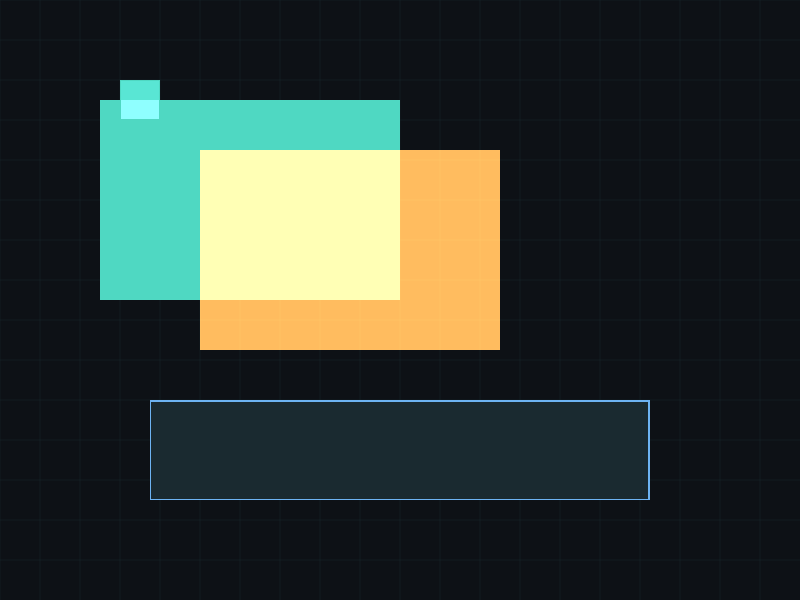
示例 1:填充矩形
xge_rect_t r = { 100, 100, 300, 200 };  // x, y, w, h
xgeShapeRectFill(r, 0x4FD8C2FF);

// 半透明叠加
xge_rect_t r2 = { 200, 150, 300, 200 };
xgeShapeRectFill(r2, 0xFFB45480);  // Alpha=0x80 (50%)
示例 2:描边矩形
// 2px 描边
xge_rect_t box = { 150, 250, 500, 100 };
xgeShapeRectStroke(box, 2.0f, 0xFF6B5EFF);

// 填充 + 描边组合
xgeShapeRectFill(box, 0x1A2A30FF);
xgeShapeRectStroke(box, 1.5f, 0x6DB3F2FF);
示例 3:网格背景
// 绘制 40px 网格
for (float x = 0; x < 800; x += 40)
    xgeShapeLine(x, 0, x, 600, 0.5f, 0x1A2A3040);
for (float y = 0; y < 600; y += 40)
    xgeShapeLine(0, y, 800, y, 0.5f, 0x1A2A3040);

// 高亮选中单元格
xge_rect_t cell = { 120, 80, 40, 40 };
xgeShapeRectFill(cell, 0x4FD8C230);
xgeShapeRectStroke(cell, 1.0f, 0x4FD8C2FF);
完整代码
将以下代码保存为 ch22_main.c,编译后运行即可看到矩形的填充与描边效果:
#include "xge.h"

static int onFrame(void* pUser) {
    (void)pUser;
    xgeClear(0x081114FF);

    // 填充矩形
    xgeShapeRectFill(100, 100, 250, 150, 0x4FD8C2FF);

    // 描边矩形(线宽 3)
    xgeShapeRectStroke((xge_rect_t){450, 100, 250, 150}, 0xFFB454FF, 3.0f)

    // 半透明填充 + 描边组合
    xgeShapeRectFill(200, 350, 400, 180, 0x6DB3F240);
    xgeShapeRectStroke((xge_rect_t){200, 350, 400, 180}, 0x6DB3F2FF, 2.0f)

    return XGE_OK;
}

int main(void) {
    xge_desc_t d = {0};
    d.iWidth  = 800;
    d.iHeight = 600;
    d.sTitle  = "ch22 - Rectangles";
    d.iFlags  = XGE_INIT_VSYNC;
    xgeInit(&d);
    xgeRun(onFrame, NULL);
    xgeUnit();
    return 0;
}
代码讲解
xgeShapeRectFill(x, y, w, h, color)绘制实心矩形,(x,y) 为左上角。xgeShapeRectStroke((xge_rect_t){x, y, w, h}, width, color)绘制矩形边框,width 为线宽。- 组合使用填充 + 描边可创建“卡片”效果(半透明背景 + 实线边框)。
- 颜色末尾
40(Alpha=64)表示约 25% 不透明度。
要点与陷阱
- 描边居中:Stroke 的线宽以矩形边缘为中心,内外各占一半。
- 负宽高:fWidth/fHeight 为负时矩形向反方向延伸,但建议始终用正值。
- 零面积:宽或高为 0 时不绘制任何内容。
- 批量绘制:大量矩形考虑用 ShapeBatch(第 106 章)减少 Draw Call。
进阶练习
- 实现一个进度条:外框描边 + 内部填充按比例增长。
- 用矩形绘制一个棋盘格(8×8 交替颜色)。
- 实现窗口选中效果:鼠标点击哪个矩形,哪个就高亮描边。