概念
- 四角独立半径:通过
xge_shape_round_rect_t分别为左上、右上、右下、左下设置不同半径。 - 渲染模式:AUTO(引擎自动选择)、SDF(有向距离场,适合大圆角)、MESH(网格细分,适合小圆角)。
- 全局默认模式:
xgeShapeRoundRectModeSet/Get设置非 Ex 版本使用的模式。
API 速查
| 函数 / 常量 | 说明 |
|---|---|
xge_shape_round_rect_t { fTopLeft, fTopRight, fBottomRight, fBottomLeft } | 四角半径结构体 |
#define XGE_SHAPE_ROUND_RECT_AUTO 0 | 自动选择渲染算法 |
#define XGE_SHAPE_ROUND_RECT_SDF 1 | SDF 渲染 |
#define XGE_SHAPE_ROUND_RECT_MESH 2 | Mesh 细分渲染 |
void xgeShapeRoundRectModeSet(int iMode) | 设置全局圆角矩形渲染模式 |
int xgeShapeRoundRectModeGet(void) | 获取全局圆角矩形渲染模式 |
void xgeShapeRoundRectFillEx(xge_rect_t tRect, xge_shape_round_rect_t tRadii, int iMode, uint32_t iColor) | 四角独立填充 |
void xgeShapeRoundRectFillExPx(...) | 四角独立填充(像素坐标) |
void xgeShapeRoundRectStrokeEx(xge_rect_t tRect, xge_shape_round_rect_t tRadii, int iMode, float fWidth, uint32_t iColor) | 四角独立描边 |
void xgeShapeRoundRectStrokeExPx(...) | 四角独立描边(像素坐标) |
void xgeShapeRoundRectDrawEx(xge_rect_t tRect, xge_shape_round_rect_t tRadii, int iMode, uint32_t iFillColor, float fStrokeWidth, uint32_t iStrokeColor) | 四角独立填充+描边 |
void xgeShapeRoundRectDrawExPx(...) | 四角独立填充+描边(像素坐标) |
编译本章示例
gcc -O2 -I. -o ch30.exe ch30_main.c build\xge.lib -lm -lws2_32 -liphlpapi -lgdi32 -luser32 -lshell32 -lopengl32 -lole32 -lwinmm -lavrt
.\ch30.exe
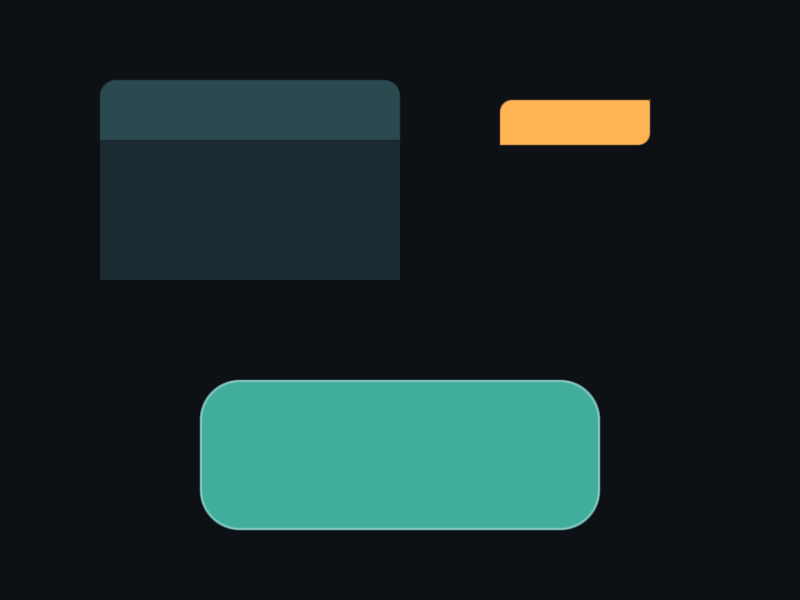
示例 1:仅上方圆角(卡片头部)
// 上方两角圆角 16,下方直角
xge_shape_round_rect_t radii = { 16, 16, 0, 0 };
xge_rect_t header = { 100, 100, 300, 60 };
xgeShapeRoundRectFillEx(header, radii, XGE_SHAPE_ROUND_RECT_AUTO, 0x2A4A50FF);

// 下方主体(无圆角)
xge_rect_t body = { 100, 160, 300, 140 };
xgeShapeRectFill(body, 0x1A2A30FF);
示例 2:对角圆角(标签样式)
// 左上 + 右下圆角,其余直角
xge_shape_round_rect_t tag = { 12, 0, 12, 0 };
xge_rect_t rect = { 500, 200, 120, 40 };
xgeShapeRoundRectFillEx(rect, tag, XGE_SHAPE_ROUND_RECT_SDF, 0xFFB454FF);
示例 3:切换全局模式
// 查询当前模式
int mode = xgeShapeRoundRectModeGet();

// 切换为 SDF(大圆角更平滑)
xgeShapeRoundRectModeSet(XGE_SHAPE_ROUND_RECT_SDF);

// 此时非 Ex 版本也使用 SDF
xge_rect_t r = { 200, 400, 200, 100 };
xgeShapeRoundRectFill(r, 30.0f, 0x4FD8C2FF);

// 恢复 AUTO
xgeShapeRoundRectModeSet(XGE_SHAPE_ROUND_RECT_AUTO);
完整代码
将以下代码保存为 ch30_main.c,编译后运行即可看到四角独立圆角与模式切换效果:
#include "xge.h"

static int onFrame(void* pUser) {
    (void)pUser;
    xgeClear(0x081114FF);

    // 卡片头部:仅上方圆角
    xge_shape_round_rect_t topRadii = { 16, 16, 0, 0 };
    xge_rect_t header = { 80, 80, 300, 60 };
    xgeShapeRoundRectFillEx(header, topRadii, XGE_SHAPE_ROUND_RECT_AUTO, 0x2A4A50FF);

    // 卡片主体(无圆角)
    xge_rect_t body = { 80, 140, 300, 160 };
    xgeShapeRectFill(body, 0x1A2A30FF);

    // 对角圆角标签
    xge_shape_round_rect_t tagRadii = { 12, 0, 12, 0 };
    xge_rect_t tag = { 450, 100, 140, 40 };
    xgeShapeRoundRectFillEx(tag, tagRadii, XGE_SHAPE_ROUND_RECT_SDF, 0xFFB454FF);

    // 切换全局模式为 SDF,绘制大圆角
    xgeShapeRoundRectModeSet(XGE_SHAPE_ROUND_RECT_SDF);
    xge_rect_t big = { 80, 380, 250, 120 };
    xgeShapeRoundRectFill(big, 40.0f, 0x4FD8C2FF);

    // 恢复 AUTO
    xgeShapeRoundRectModeSet(XGE_SHAPE_ROUND_RECT_AUTO);
    xge_rect_t big2 = { 400, 380, 250, 120 };
    xgeShapeRoundRectFill(big2, 40.0f, 0x6DB3F2FF);

    return XGE_OK;
}

int main(void) {
    xge_desc_t d = {0};
    d.iWidth  = 800;
    d.iHeight = 600;
    d.sTitle  = "ch30 - RoundRect Ex";
    d.iFlags  = XGE_INIT_VSYNC;
    xgeInit(&d);
    xgeRun(onFrame, NULL);
    xgeUnit();
    return 0;
}
代码讲解
- 四角独立:
xge_shape_round_rect_t按 TopLeft→TopRight→BottomRight→BottomLeft 顺序设置半径,设为 0 的角保持直角。 - 卡片头部:上方两角 16px 圆角 + 下方直角,与无圆角主体拼接成完整卡片。
- Ex 的 iMode:Ex 版本可单独指定渲染算法,不受全局 ModeSet 影响。
- 全局模式切换:
xgeShapeRoundRectModeSet影响后续所有非 Ex 版本的圆角矩形绘制。
要点与陷阱
- 字段顺序:xge_shape_round_rect_t 按 TopLeft → TopRight → BottomRight → BottomLeft 顺时针排列。
- AUTO 推荐:大多数情况用 AUTO 即可,引擎根据半径/尺寸自动选最优算法。
- SDF vs MESH:SDF 在大半径时边缘更平滑;MESH 在极小半径时性能更好。
- Ex 的 iMode 覆盖全局:Ex 版本的 iMode 参数优先于全局 ModeSet。
- 相邻半径之和:若相邻两角半径之和超过边长,引擎自动等比缩小。
进阶练习
- 实现一个聊天气泡:一侧有尖角(三角),另一侧大圆角。
- 对比 AUTO / SDF / MESH 三种模式在半径 50 时的渲染质量(放大截图)。
- 实现一个"票据"形状:上下边有半圆缺口(用四角独立 + 裁剪组合)。