概念
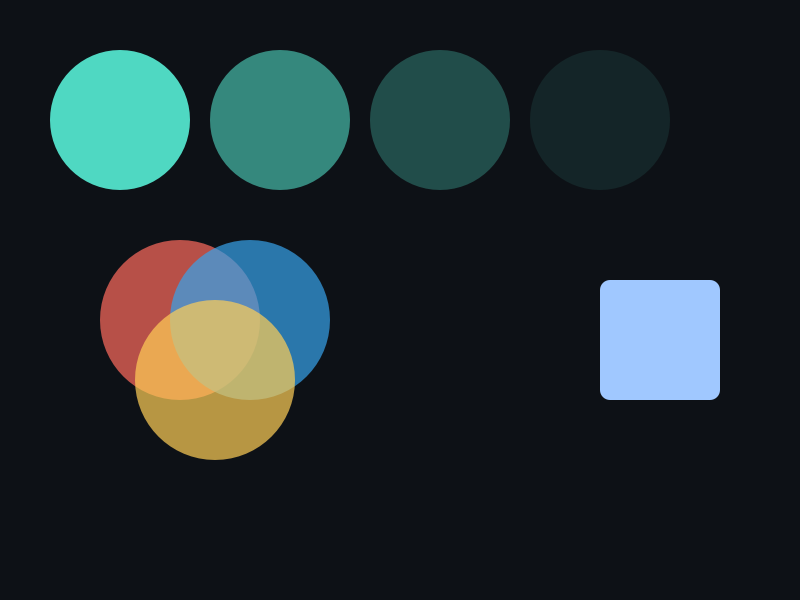
- Opacity:0.0(全透明)~ 1.0(不透明),作用于整个 Shape(填充+描边)。
- 与颜色 Alpha 相乘:最终 Alpha = 颜色 Alpha × Opacity。
- Visible:0 = 跳过绘制(不消耗渲染时间),1 = 正常绘制。
API 速查
| 函数 | 说明 |
|---|---|
int xgeShapeExOpacity(xge_shape_ex pShape, float fOpacity) | 设置整体透明度 |
int xgeShapeExOpacityGet(xge_shape_ex pShape, float* pOpacity) | 获取透明度 |
int xgeShapeExVisible(xge_shape_ex pShape, int bVisible) | 设置可见性 |
int xgeShapeExVisibleGet(xge_shape_ex pShape, int* pVisible) | 获取可见性 |
编译本章示例
gcc -O2 -I. -o ch53.exe ch53_main.c build\xge.lib -lm -lws2_32 -liphlpapi -lgdi32 -luser32 -lshell32 -lopengl32 -lole32 -lwinmm -lavrt
.\ch53.exe
示例 1:淡入动画
static float s_fAlpha = 0.0f;

void OnFrame(void) {
    s_fAlpha += 0.02f;
    if (s_fAlpha > 1.0f) s_fAlpha = 1.0f;

    xgeShapeExOpacity(g_shape, s_fAlpha);
    xgeShapeExDraw(g_shape, 0.25f);
}
示例 2:Visible 切换
// 隐藏 Shape(不绘制,零开销)
xgeShapeExVisible(g_shape, 0);

// 需要时重新显示
xgeShapeExVisible(g_shape, 1);

// 查询当前状态
int bVis;
xgeShapeExVisibleGet(g_shape, &bVis);
完整代码
将以下代码保存为 ch53_main.c,编译后运行即可看到透明度淡入与呼吸灯效果:
#include "xge.h"
#include <math.h>

static float s_fTime = 0.0f;

static int onFrame(void* pUser) {
    (void)pUser;
    xgeClear(0x081114FF);
    s_fTime += 0.03f;

    // 淡入动画:Opacity 从 0 到 1
    float fadeIn = s_fTime;
    if (fadeIn > 1.0f) fadeIn = 1.0f;

    xge_shape_ex s1 = NULL;
    xgeShapeExCreate(&s1);
    xgeShapeExAppendRect(s1, 80,100, 280,180, 16,16, 1);
    xgeShapeExFillColor(s1, 0x4FD8C2FF);
    xgeShapeExOpacity(s1, fadeIn);
    xgeShapeExDraw(s1, 0.25f);
    xgeShapeExDestroy(s1);

    // 呼吸灯:Opacity 在 0.3~1.0 正弦波动
    float breath = 0.65f + 0.35f * (float)sin(s_fTime * 2.0f);

    xge_shape_ex s2 = NULL;
    xgeShapeExCreate(&s2);
    xgeShapeExAppendCircle(s2, 580, 190, 90, 90, 1);
    xgeShapeExFillColor(s2, 0xFFB454FF);
    xgeShapeExOpacity(s2, breath);
    xgeShapeExDraw(s2, 0.25f);
    xgeShapeExDestroy(s2);

    // Visible 切换:每 60 帧切换一次
    int bShow = ((int)(s_fTime * 60.0f) / 60) % 2;
    xge_shape_ex s3 = NULL;
    xgeShapeExCreate(&s3);
    xgeShapeExAppendRect(s3, 250,380, 300,100, 12,12, 1);
    xgeShapeExFillColor(s3, 0x4FD8C2FF);
    xgeShapeExVisible(s3, bShow);
    xgeShapeExDraw(s3, 0.25f);
    xgeShapeExDestroy(s3);
    return XGE_OK;
}

int main(void) {
    xge_desc_t d = {0};
    d.iWidth  = 800;
    d.iHeight = 600;
    d.sTitle  = "ch53 - Opacity & Visible";
    d.iFlags  = XGE_INIT_VSYNC;
    xgeInit(&d);
    xgeRun(onFrame, NULL);
    xgeUnit();
    return 0;
}
代码讲解
- Opacity:整体透明度 0~1,影响整个 Shape(包括填充和描边)。
- 淡入动画:每帧增加 Opacity 直到 1.0,实现平滑出现效果。
- 呼吸灯:用 sin 函数让 Opacity 在 0.3~1.0 之间波动。
- Visible=0:Draw 调用直接返回,零 GPU 开销,适合图层显示/隐藏。
要点与陷阱
- 默认值:Opacity = 1.0,Visible = 1。
- Opacity vs Alpha:修改颜色 Alpha 只影响该颜色;Opacity 影响整个 Shape。
- Visible = 0 时:Draw 调用直接返回,不产生任何 GPU 命令。
- DrawEx 的 fParentOpacity:与 Shape 自身 Opacity 相乘(第 62 章)。
进阶练习
- 实现呼吸灯效果:Opacity 在 0.3~1.0 之间正弦波动。
- 用 Visible 实现图层显示/隐藏切换面板。